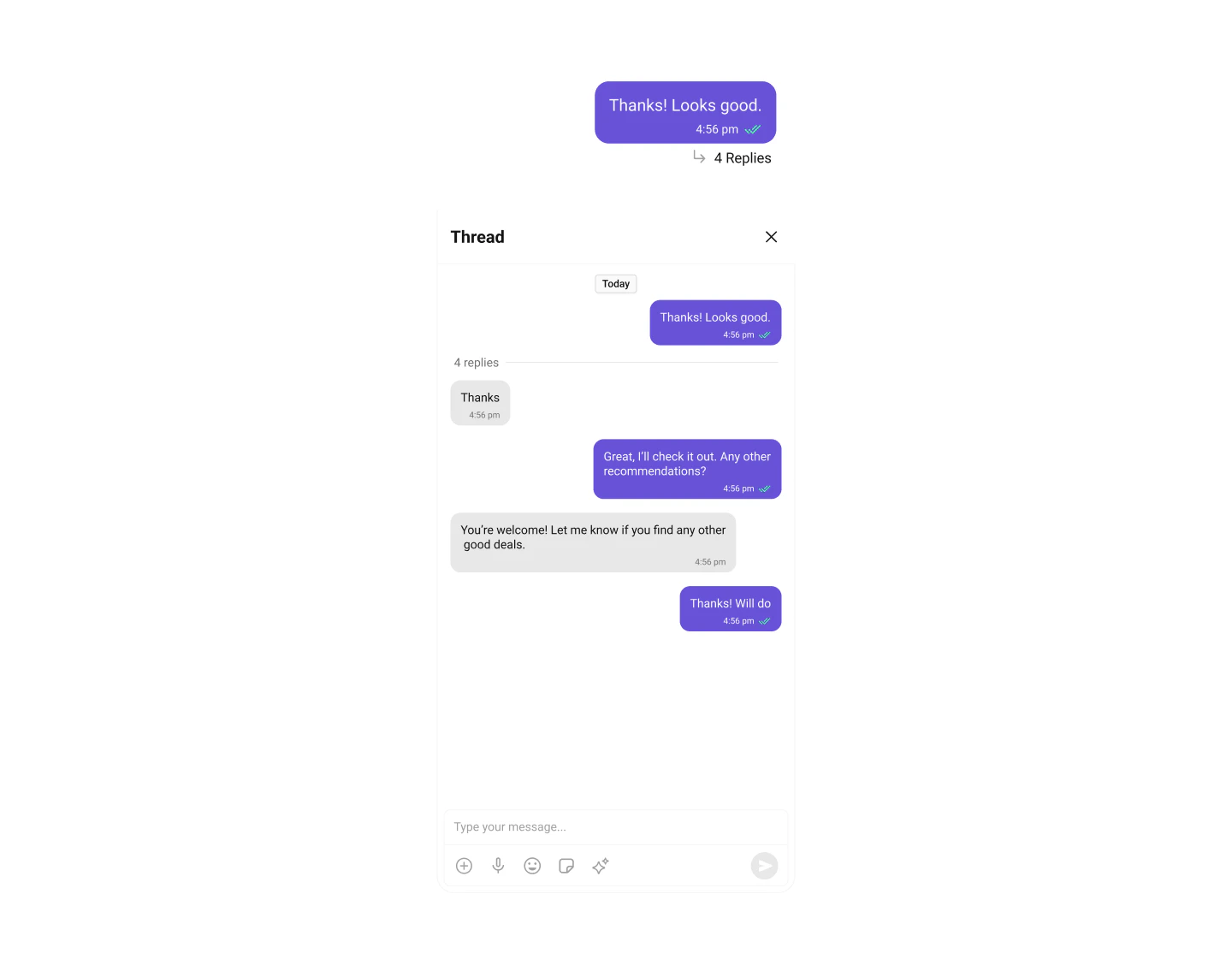
Display and customize the header for threaded message conversations in CometChat UI Kit for iOS
The CometChatThreadedMessageHeader component displays the header for threaded message conversations showing parent message info. By default, the parent message appears at the top, the message composer is at the bottom, and a message list containing all replies is displayed between them.
Since CometChatThreadedMessageHeader is a view, you can add it to your view controller using the following code snippet:
Swift
Report incorrect code
Copy
Ask AI
let threadedMessage = CometChatThreadedMessageHeader()view.addSubview(threadedMessage)
Ensure to pass and present threadedMessage. If a navigation controller is already in use, utilize the pushViewController function instead of directly presenting the view controller.
Filters allow you to customize the data displayed in a list within a Component. You can filter the list based on your specific criteria for a more customized experience. Filters can be applied using RequestBuilders of Chat SDK.ThreadedMessages does not have its own Filters. However, you can filter the messages list in ThreadedMessages Component using MessageListConfiguration.ExampleIn this example, we are filtering messages and searching for messages that contain the keyword “payment”:
Events are emitted by a Component. By using events, you can extend existing functionality. Being global events, they can be applied in multiple locations and are capable of being added or removed.The MessageList Component does not emit any events of its own.
To fit your app’s design requirements, you can customize the appearance of the conversation component. We provide exposed methods that allow you to modify the experience and behavior according to your specific needs.
These are a set of small functional customizations that allow you to fine-tune the overall experience of the component. With these, you can set maximum lines the text area will show before scrolling in the composer, edit a message, add header view and footer view to the composer, and more.Below is a list of customizations along with corresponding code snippets:
Property
Description
Code
hideReplyCount
Hides the reply count for threaded messages.
hideReplyCount = true
hideReplyCountBar
Hides the reply count bar in the thread.
hideReplyCountBar = true
hideReceipts
Hides read and delivery receipts for messages.
hideReceipts = true
hideAvatar
Hides the avatar in the threaded message view.
hideAvatar = true
setMaxHeight
Sets the maximum height for the threaded message view.
setMaxHeight(300)
setMessageAlignment
Sets the alignment of messages (e.g., left or right).
setMessageAlignment(.right)
setParentMessage
Sets the parent message for the threaded conversation.
For advanced-level customization, you can set custom views to the component. This lets you tailor each aspect of the component to fit your exact needs and application aesthetics. You can create and define your views, layouts, and UI elements and then incorporate those into the component.
You can modify the date pattern to your requirement using .set(datePattern:). This method accepts a function with a return type String. Inside the function, you can create your own pattern and return it as a String.Example
Swift
Report incorrect code
Copy
Ask AI
// MARK: - Custom date patternlet threadedMessageHeader = CometChatThreadedMessageHeader()threadedMessageHeader.set(datePattern: { timestamp in guard let timestamp = timestamp else { return "" } let date = Date(timeIntervalSince1970: TimeInterval(timestamp / 1000)) let formatter = DateFormatter() formatter.dateFormat = "dd-MM-yyyy" return formatter.string(from: date)})
This functionality dynamically assigns a list of text formatters. If a custom list is provided, it uses that list. Otherwise, it gracefully falls back to the default text formatters retrieved from the data source for seamless integration.ExampleThis code customizes a CometChat text formatter to identify and style the word “sure”, with handling options for interactions like string search, scrolling, and item clicks. The custom formatter is then applied to CometChat messages.
CometChatMessageTemplate is a pre-defined structure for creating message views that can be used as a starting point or blueprint for creating message views often known as message bubbles. For more information, you can refer to CometChatMessageTemplate.
Show only specific types of messages in the thread:
Swift
Report incorrect code
Copy
Ask AI
// Filter to show only text messages in threadlet messageRequestBuilder = MessagesRequest.MessageRequestBuilder() .set(parentMessageId: parentMessage.id) .set(types: ["text"]) .set(limit: 30)let messageList = CometChatMessageList()messageList.set(messagesRequestBuilder: messageRequestBuilder)
To ensure that the CometChatThreadedMessageHeader is properly configured, passing the controller is mandatory.
Report incorrect code
Copy
Ask AI
let threadedMessageHeader = CometChatThreadedMessageHeader()threadedMessageHeader.set(controller: UIViewController) // Passing the controller is required