The CometChatConversations component displays a list of all conversations (one-on-one and group chats) for the currently logged-in user. It shows the last message, unread count, typing indicators, and user presence in real-time.
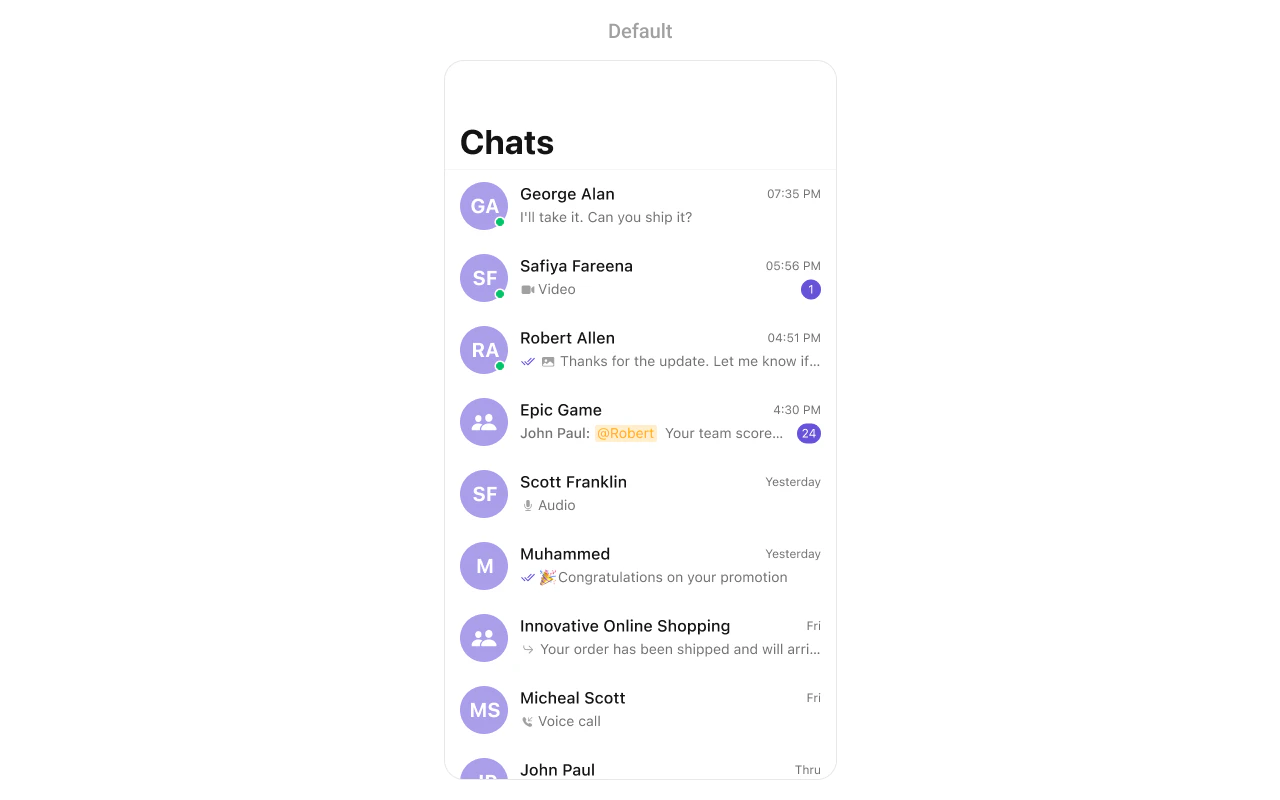
CometChatConversations showing a list of recent conversations with user avatars, last message previews, timestamps, and unread message badges
{
  "component": "CometChatConversations",
  "package": "CometChatUIKitSwift",
  "import": "import CometChatUIKitSwift\nimport CometChatSDK",
  "description": "Displays a list of all conversations for the logged-in user with real-time updates for messages, typing indicators, and presence.",
  "inherits": "UIViewController",
  "primaryOutput": {
    "callback": "onItemClick",
    "type": "(Conversation, IndexPath) -> Void"
  },
  "props": {
    "data": {
      "conversationRequestBuilder": {
        "type": "ConversationRequest.ConversationRequestBuilder?",
        "default": "nil",
        "note": "Custom request builder for filtering conversations"
      }
    },
    "callbacks": {
      "onItemClick": "(Conversation, IndexPath) -> Void",
      "onItemLongClick": "(Conversation, IndexPath) -> Void",
      "onBack": "() -> Void",
      "onSelection": "([Conversation]) -> Void",
      "onError": "(CometChatException) -> Void",
      "onEmpty": "() -> Void",
      "onLoad": "([Conversation]) -> Void"
    },
    "visibility": {
      "hideSearch": { "type": "Bool", "default": false },
      "hideReceipts": { "type": "Bool", "default": false },
      "hideUserStatus": { "type": "Bool", "default": false },
      "hideGroupType": { "type": "Bool", "default": false },
      "hideDeleteConversationOption": { "type": "Bool", "default": false },
      "hideNavigationBar": { "type": "Bool", "default": false },
      "hideBackButton": { "type": "Bool", "default": false }
    },
    "sound": {
      "disableSoundForMessages": { "type": "Bool", "default": false },
      "customSoundForMessages": { "type": "URL?", "default": "nil" }
    },
    "selection": {
      "selectionMode": { "type": "SelectionMode", "default": ".none" }
    },
    "viewSlots": {
      "listItemView": "(Conversation) -> UIView",
      "leadingView": "(Conversation) -> UIView",
      "titleView": "(Conversation) -> UIView",
      "subtitleView": "(Conversation) -> UIView",
      "tailView": "(Conversation) -> UIView",
      "emptyStateView": "() -> UIView",
      "errorStateView": "() -> UIView",
      "loadingStateView": "() -> UIView"
    },
    "formatting": {
      "datePattern": "(Conversation) -> String",
      "textFormatters": "[CometChatTextFormatter]"
    }
  },
  "events": [
    {
      "name": "ccConversationDelete",
      "payload": "Conversation",
      "description": "Fires when a conversation is deleted"
    }
  ],
  "sdkListeners": [
    "onMessageReceived",
    "onMessageEdited",
    "onMessageDeleted",
    "onTypingStarted",
    "onTypingEnded",
    "onUserOnline",
    "onUserOffline",
    "onGroupMemberJoined",
    "onGroupMemberLeft"
  ],
  "compositionExample": {
    "description": "Conversations list navigating to Messages",
    "components": ["CometChatConversations", "CometChatMessages"],
    "flow": "User taps conversation → onItemClick fires → Navigate to CometChatMessages with user/group"
  },
  "types": {
    "Conversation": {
      "conversationId": "String?",
      "conversationType": "ConversationType",
      "conversationWith": "AppEntity?",
      "lastMessage": "BaseMessage?",
      "unreadMessageCount": "Int"
    },
    "ConversationType": {
      "user": "One-on-one conversation",
      "group": "Group conversation",
      "both": "All conversation types"
    }
  }
}
FieldValue
ComponentCometChatConversations
PackageCometChatUIKitSwift
InheritsUIViewController

Where It Fits

CometChatConversations serves as the main entry point for chat functionality. It displays all conversations and navigates to CometChatMessages when a conversation is selected.
import UIKit
import CometChatUIKitSwift
import CometChatSDK

class ChatListViewController: UIViewController {
    
    private var conversationsController: CometChatConversations!
    
    override func viewDidLoad() {
        super.viewDidLoad()
        setupConversations()
    }
    
    private func setupConversations() {
        conversationsController = CometChatConversations()
        
        // Handle conversation selection - navigate to messages
        conversationsController.set(onItemClick: { [weak self] conversation, indexPath in
            self?.openMessages(for: conversation)
        })
        
        navigationController?.pushViewController(conversationsController, animated: true)
    }
    
    private func openMessages(for conversation: Conversation) {
        let messagesVC = CometChatMessages()
        
        if let user = conversation.conversationWith as? User {
            messagesVC.set(user: user)
        } else if let group = conversation.conversationWith as? Group {
            messagesVC.set(group: group)
        }
        
        navigationController?.pushViewController(messagesVC, animated: true)
    }
}
CometChatConversations showing integration flow with conversation list navigating to messages screen

Minimal Render

import CometChatUIKitSwift

let conversations = CometChatConversations()
navigationController?.pushViewController(conversations, animated: true)
CometChatConversations showing minimal render with default configuration displaying conversation list

Filtering

Use ConversationRequest.ConversationRequestBuilder to filter which conversations appear in the list. The builder pattern allows chaining multiple filter conditions.
import CometChatUIKitSwift
import CometChatSDK

// Create a custom request builder
let requestBuilder = ConversationRequest.ConversationRequestBuilder(limit: 30)
    .set(conversationType: .both)

let conversations = CometChatConversations(conversationRequestBuilder: requestBuilder)

Filter Recipes

RecipeCode
Show only one-on-one chats.set(conversationType: .user)
Show only group chats.set(conversationType: .group)
Filter by tags.withTags(true).set(tags: ["support", "sales"])
Limit resultsConversationRequestBuilder(limit: 20)
Include user/group tags.withUserAndGroupTags(true)

Actions and Events

Callback Props

onItemClick

Fires when a user taps on a conversation. Use this to navigate to the messages screen.
import CometChatUIKitSwift
import CometChatSDK

let conversations = CometChatConversations()

conversations.set(onItemClick: { [weak self] conversation, indexPath in
    guard let self = self else { return }
    
    let messagesVC = CometChatMessages()
    
    if let user = conversation.conversationWith as? User {
        messagesVC.set(user: user)
    } else if let group = conversation.conversationWith as? Group {
        messagesVC.set(group: group)
    }
    
    self.navigationController?.pushViewController(messagesVC, animated: true)
})

onItemLongClick

Fires when a user long-presses on a conversation. Use this to show additional options like delete or mute.
import CometChatUIKitSwift
import CometChatSDK

let conversations = CometChatConversations()

conversations.set(onItemLongClick: { [weak self] conversation, indexPath in
    guard let self = self else { return }
    
    let alert = UIAlertController(title: "Options", message: nil, preferredStyle: .actionSheet)
    
    alert.addAction(UIAlertAction(title: "Delete", style: .destructive) { [weak self] _ in
        self?.deleteConversation(conversation)
    })
    
    alert.addAction(UIAlertAction(title: "Cancel", style: .cancel))
    self.present(alert, animated: true)
})

// Helper method to delete conversation using SDK
private func deleteConversation(_ conversation: Conversation) {
    CometChat.deleteConversation(
        conversationWith: conversation.conversationWith?.uid ?? "",
        conversationType: conversation.conversationType
    ) { success in
        print("Conversation deleted successfully")
    } onError: { error in
        print("Delete failed: \(error?.errorDescription ?? "")")
    }
}

onBack

Fires when the back button is pressed. Use this for custom navigation handling.
import CometChatUIKitSwift

let conversations = CometChatConversations()

conversations.set(onBack: { [weak self] in
    self?.navigationController?.popViewController(animated: true)
})

onSelection

Fires when conversations are selected in selection mode. Returns the list of selected conversations.
import CometChatUIKitSwift
import CometChatSDK

let conversations = CometChatConversations()
conversations.selectionMode = .multiple

conversations.set(onSelection: { [weak self] selectedConversations in
    print("Selected \(selectedConversations.count) conversations")
})

onError

Fires when an error occurs while loading conversations.
import CometChatUIKitSwift

let conversations = CometChatConversations()

conversations.set(onError: { error in
    print("Error loading conversations: \(error.errorDescription)")
})

onEmpty

Fires when the conversation list is empty.
import CometChatUIKitSwift

let conversations = CometChatConversations()

conversations.set(onEmpty: {
    print("No conversations found")
})

onLoad

Fires when conversations are successfully loaded.
import CometChatUIKitSwift
import CometChatSDK

let conversations = CometChatConversations()

conversations.set(onLoad: { conversations in
    print("Loaded \(conversations.count) conversations")
})

Actions Reference

MethodDescriptionExample
set(onItemClick:)Triggered when a conversation is tappedNavigate to messages
set(onItemLongClick:)Triggered on long pressShow options menu
set(onBack:)Triggered when back button is pressedCustom navigation
set(onSelection:)Triggered in selection modeMulti-select conversations
set(onError:)Triggered when an error occursShow error alert
set(onEmpty:)Triggered when list is emptyShow empty state
set(onLoad:)Triggered when conversations loadAnalytics tracking

Global UI Events

EventFires whenPayload
ccConversationDeleteA conversation is deletedConversation
import CometChatUIKitSwift
import CometChatSDK

class MyViewController: UIViewController, CometChatConversationEventListener {
    
    override func viewDidLoad() {
        super.viewDidLoad()
        CometChatConversationEvents.addListener("my-listener", self)
    }
    
    override func viewWillDisappear(_ animated: Bool) {
        super.viewWillDisappear(animated)
        CometChatConversationEvents.removeListener("my-listener")
    }
    
    func ccConversationDelete(conversation: Conversation) {
        print("Conversation deleted: \(conversation.conversationId ?? "")")
    }
}

SDK Events (Real-Time, Automatic)

SDK ListenerInternal behavior
onMessageReceivedUpdates last message and moves conversation to top
onMessageEditedUpdates last message preview if edited message is latest
onMessageDeletedUpdates last message preview if deleted message was latest
onTypingStartedShows typing indicator for the conversation
onTypingEndedHides typing indicator for the conversation
onUserOnlineUpdates online status indicator for user conversations
onUserOfflineUpdates offline status indicator for user conversations
onGroupMemberJoinedUpdates group member count
onGroupMemberLeftUpdates group member count

Custom View Slots

SlotSignatureReplaces
listItemView(Conversation) -> UIViewEntire conversation row
leadingView(Conversation) -> UIViewAvatar / left section
titleView(Conversation) -> UIViewName / title text
subtitleView(Conversation) -> UIViewLast message preview
tailView(Conversation) -> UIViewRight side (time, badge)
emptyStateView() -> UIViewEmpty state display
errorStateView() -> UIViewError state display
loadingStateView() -> UIViewLoading state display

listItemView

Replace the entire conversation row with a custom design.
import UIKit
import CometChatUIKitSwift
import CometChatSDK

let conversations = CometChatConversations()

conversations.set(listItemView: { conversation in
    let customView = CustomConversationCell()
    customView.configure(with: conversation)
    return customView
})
// CustomConversationCell.swift
class CustomConversationCell: UIView {
    
    private let avatarView = CometChatAvatar(image: UIImage())
    private let nameLabel = UILabel()
    private let messageLabel = UILabel()
    private let timeLabel = UILabel()
    
    override init(frame: CGRect) {
        super.init(frame: frame)
        setupUI()
    }
    
    required init?(coder: NSCoder) {
        fatalError("init(coder:) has not been implemented")
    }
    
    private func setupUI() {
        nameLabel.font = UIFont.systemFont(ofSize: 16, weight: .semibold)
        messageLabel.font = UIFont.systemFont(ofSize: 14)
        messageLabel.textColor = UIColor.secondaryLabel
        timeLabel.font = UIFont.systemFont(ofSize: 12)
        timeLabel.textColor = UIColor.tertiaryLabel
        
        // Add subviews and constraints...
    }
    
    func configure(with conversation: Conversation) {
        if let user = conversation.conversationWith as? User {
            nameLabel.text = user.name
            avatarView.setAvatar(avatarUrl: user.avatar, with: user.name ?? "")
        } else if let group = conversation.conversationWith as? Group {
            nameLabel.text = group.name
            avatarView.setAvatar(avatarUrl: group.icon, with: group.name ?? "")
        }
        
        if let textMessage = conversation.lastMessage as? TextMessage {
            messageLabel.text = textMessage.text
        }
    }
}

subtitleView

Customize just the subtitle area below the conversation name.
import UIKit
import CometChatUIKitSwift
import CometChatSDK

let conversations = CometChatConversations()

conversations.set(subtitleView: { conversation in
    let label = UILabel()
    label.font = UIFont.systemFont(ofSize: 13)
    label.textColor = UIColor.secondaryLabel
    
    if let textMessage = conversation.lastMessage as? TextMessage {
        label.text = textMessage.text
    } else if conversation.lastMessage is MediaMessage {
        label.text = "📷 Photo"
    } else {
        label.text = "No messages yet"
    }
    
    return label
})

leadingView

Customize the avatar / left section of the conversation row.
Signature(Conversation) -> UIView
ReplacesAvatar / left section
import UIKit
import CometChatUIKitSwift
import CometChatSDK

let conversations = CometChatConversations()

conversations.set(leadingView: { conversation in
    let containerView = UIView()
    containerView.translatesAutoresizingMaskIntoConstraints = false
    
    let avatarView = CometChatAvatar(image: UIImage())
    avatarView.translatesAutoresizingMaskIntoConstraints = false
    
    if let user = conversation.conversationWith as? User {
        avatarView.setAvatar(avatarUrl: user.avatar, with: user.name ?? "")
    } else if let group = conversation.conversationWith as? Group {
        avatarView.setAvatar(avatarUrl: group.icon, with: group.name ?? "")
    }
    
    containerView.addSubview(avatarView)
    
    // Add online indicator
    let statusIndicator = UIView()
    statusIndicator.backgroundColor = UIColor.systemGreen
    statusIndicator.layer.cornerRadius = 6
    statusIndicator.translatesAutoresizingMaskIntoConstraints = false
    containerView.addSubview(statusIndicator)
    
    NSLayoutConstraint.activate([
        avatarView.widthAnchor.constraint(equalToConstant: 48),
        avatarView.heightAnchor.constraint(equalToConstant: 48),
        avatarView.centerXAnchor.constraint(equalTo: containerView.centerXAnchor),
        avatarView.centerYAnchor.constraint(equalTo: containerView.centerYAnchor),
        statusIndicator.widthAnchor.constraint(equalToConstant: 12),
        statusIndicator.heightAnchor.constraint(equalToConstant: 12),
        statusIndicator.trailingAnchor.constraint(equalTo: avatarView.trailingAnchor),
        statusIndicator.bottomAnchor.constraint(equalTo: avatarView.bottomAnchor)
    ])
    
    return containerView
})

titleView

Customize the title area that displays the conversation name.
Signature(Conversation) -> UIView
ReplacesName / title text area
import UIKit
import CometChatUIKitSwift
import CometChatSDK

let conversations = CometChatConversations()

conversations.set(titleView: { conversation in
    let stackView = UIStackView()
    stackView.axis = .horizontal
    stackView.spacing = 8
    stackView.alignment = .center
    
    // Name label
    let nameLabel = UILabel()
    nameLabel.font = UIFont.systemFont(ofSize: 16, weight: .semibold)
    nameLabel.textColor = UIColor.label
    
    if let user = conversation.conversationWith as? User {
        nameLabel.text = user.name
    } else if let group = conversation.conversationWith as? Group {
        nameLabel.text = group.name
    }
    
    stackView.addArrangedSubview(nameLabel)
    
    // Add verified badge for specific users
    if let user = conversation.conversationWith as? User,
       user.metadata?["verified"] as? Bool == true {
        let badgeImage = UIImageView(image: UIImage(systemName: "checkmark.seal.fill"))
        badgeImage.tintColor = UIColor.systemBlue
        badgeImage.widthAnchor.constraint(equalToConstant: 16).isActive = true
        badgeImage.heightAnchor.constraint(equalToConstant: 16).isActive = true
        stackView.addArrangedSubview(badgeImage)
    }
    
    return stackView
})

tailView

Customize the right side of the conversation row (time, unread badge). Note: The setter method is set(trailView:).
import UIKit
import CometChatUIKitSwift
import CometChatSDK

let conversations = CometChatConversations()

conversations.set(trailView: { conversation in
    let stackView = UIStackView()
    stackView.axis = .vertical
    stackView.alignment = .trailing
    stackView.spacing = 4
    
    // Time label
    let timeLabel = UILabel()
    timeLabel.font = UIFont.systemFont(ofSize: 12)
    timeLabel.textColor = UIColor.tertiaryLabel
    
    if let sentAt = conversation.lastMessage?.sentAt {
        let date = Date(timeIntervalSince1970: TimeInterval(sentAt))
        let formatter = DateFormatter()
        formatter.dateFormat = "h:mm a"
        timeLabel.text = formatter.string(from: date)
    }
    
    stackView.addArrangedSubview(timeLabel)
    
    // Unread badge
    if conversation.unreadMessageCount > 0 {
        let badge = UILabel()
        badge.text = "\(conversation.unreadMessageCount)"
        badge.font = UIFont.systemFont(ofSize: 12, weight: .bold)
        badge.textColor = UIColor.white
        badge.backgroundColor = UIColor.systemRed
        badge.textAlignment = .center
        badge.layer.cornerRadius = 10
        badge.clipsToBounds = true
        badge.widthAnchor.constraint(greaterThanOrEqualToConstant: 20).isActive = true
        badge.heightAnchor.constraint(equalToConstant: 20).isActive = true
        stackView.addArrangedSubview(badge)
    }
    
    return stackView
})

Styling

Style Hierarchy

  1. Global styles (CometChatConversation.style) apply to all instances
  2. Instance styles override global for specific instances

Global Level Styling

import UIKit
import CometChatUIKitSwift

// Apply global styles that affect all CometChatConversations instances
CometChatConversation.style.backgroundColor = UIColor.systemBackground
CometChatConversation.style.titleFont = UIFont.systemFont(ofSize: 17, weight: .bold)
CometChatConversation.style.titleColor = UIColor.label
CometChatConversation.style.listItemTitleTextColor = UIColor.label
CometChatConversation.style.listItemSubTitleTextColor = UIColor.secondaryLabel

// Custom avatar style
let avatarStyle = AvatarStyle()
avatarStyle.backgroundColor = UIColor(red: 0.41, green: 0.32, blue: 0.84, alpha: 1.0)
avatarStyle.cornerRadius = 8
CometChatConversation.style.avatarStyle = avatarStyle

// Custom badge style for unread count
let badgeStyle = BadgeStyle()
badgeStyle.backgroundColor = UIColor.systemRed
badgeStyle.cornerRadius = CometChatCornerStyle(cornerRadius: 10)
CometChatConversation.style.badgeStyle = badgeStyle

Instance Level Styling

import UIKit
import CometChatUIKitSwift

// Create a custom style for a specific instance
var customStyle = ConversationsStyle()
customStyle.backgroundColor = UIColor(red: 0.95, green: 0.95, blue: 0.97, alpha: 1.0)
customStyle.titleColor = UIColor(red: 0.2, green: 0.2, blue: 0.2, alpha: 1.0)
customStyle.listItemBackground = UIColor.white
customStyle.listItemCornerRadius = CometChatCornerStyle(cornerRadius: 12)

let conversations = CometChatConversations()
conversations.style = customStyle
CometChatConversations with custom styling applied showing customized background, colors, and list item appearance

Key Style Properties

PropertyTypeDefaultDescription
backgroundColorUIColorCometChatTheme.backgroundColor01Background color of the list
titleFontUIFont?CometChatTypography.setFont(size: 17, weight: .bold)Font for the navigation title
titleColorUIColor?CometChatTheme.textColorPrimaryColor for the navigation title
listItemTitleTextColorUIColorCometChatTheme.textColorPrimaryColor for conversation names
listItemTitleFontUIFontCometChatTypography.Heading4.mediumFont for conversation names
listItemSubTitleTextColorUIColorCometChatTheme.textColorSecondaryColor for last message preview
listItemSubTitleFontUIFontCometChatTypography.Body.regularFont for last message preview
listItemBackgroundUIColor.clearBackground color for list items
listItemCornerRadiusCometChatCornerStyleCometChatCornerStyle(cornerRadius: 0)Corner radius for list items
borderWidthCGFloat0Border width for the component
borderColorUIColor.clearBorder color for the component

Customization Matrix

What to changeWhereProperty/APIExample
Background colorStylebackgroundColorUIColor.systemBackground
Title appearanceStyletitleFont, titleColorUIFont.boldSystemFont(ofSize: 18)
List item lookStylelistItemBackgroundUIColor(white: 0.95, alpha: 1.0)
Unread badgeStylebadgeStyleBadgeStyle() with custom colors
Avatar appearanceStyleavatarStyleAvatarStyle() with custom radius
Hide searchPropertyhideSearchconversations.hideSearch = true
Hide receiptsPropertyhideReceiptsconversations.hideReceipts = true
Custom rowView Slotset(listItemView:)See Custom View Slots section

Methods

Swipe Action Methods

set(options:)

Sets custom swipe actions for conversation list items, replacing the default options.
@discardableResult
public func set(options: ((_ conversation: Conversation?) -> [CometChatConversationOption])?) -> Self
ParameterTypeDescription
options((Conversation?) -> [CometChatConversationOption])?Closure that returns an array of swipe action options for a conversation
import UIKit
import CometChatUIKitSwift
import CometChatSDK

let conversations = CometChatConversations()

conversations.set(options: { conversation in
    var options = [CometChatConversationOption]()
    
    // Add delete option
    let deleteOption = CometChatConversationOption(
        id: "delete",
        title: "Delete",
        icon: UIImage(systemName: "trash"),
        backgroundColor: .systemRed
    ) { conv in
        // Handle delete action
        print("Delete conversation: \(conv?.conversationId ?? "")")
    }
    options.append(deleteOption)
    
    return options
})

add(options:)

Adds additional swipe actions to the existing default options.
@discardableResult
public func add(options: ((_ conversation: Conversation?) -> [CometChatConversationOption])?) -> Self
ParameterTypeDescription
options((Conversation?) -> [CometChatConversationOption])?Closure that returns additional swipe action options to append
import UIKit
import CometChatUIKitSwift
import CometChatSDK

let conversations = CometChatConversations()

conversations.add(options: { conversation in
    var options = [CometChatConversationOption]()
    
    // Add mute option
    let muteOption = CometChatConversationOption(
        id: "mute",
        title: "Mute",
        icon: UIImage(systemName: "bell.slash"),
        backgroundColor: .systemOrange
    ) { conv in
        print("Mute conversation: \(conv?.conversationId ?? "")")
    }
    options.append(muteOption)
    
    return options
})

Data Manipulation Methods

insert(conversation:at:)

Inserts a conversation at a specific index in the list.
public func insert(conversation: Conversation, at index: Int)
ParameterTypeDescription
conversationConversationThe conversation to insert
indexIntThe position at which to insert the conversation
import CometChatUIKitSwift
import CometChatSDK

let conversations = CometChatConversations()

// Insert a conversation at the top of the list
if let conversation = someConversation {
    conversations.insert(conversation: conversation, at: 0)
}

getSelectedConversations()

Returns the list of currently selected conversations when in selection mode.
public func getSelectedConversations() -> [Conversation]
import CometChatUIKitSwift
import CometChatSDK

let conversations = CometChatConversations()
conversations.selectionMode = .multiple

// Get selected conversations
let selectedConversations = conversations.getSelectedConversations()
print("Selected \(selectedConversations.count) conversations")

getConversationList()

Returns the complete list of conversations currently displayed.
public func getConversationList() -> [Conversation]
import CometChatUIKitSwift
import CometChatSDK

let conversations = CometChatConversations()

// Get all conversations in the list
let allConversations = conversations.getConversationList()
print("Total conversations: \(allConversations.count)")

Connection Methods

connect()

Manually establishes the WebSocket connection for real-time updates. Use this when you need to reconnect after calling disconnect().
public func connect()
import CometChatUIKitSwift

let conversations = CometChatConversations()

// Reconnect to receive real-time updates
conversations.connect()

disconnect()

Manually disconnects the WebSocket connection. Use this when you want to temporarily stop receiving real-time updates, such as when the view is not visible.
public func disconnect()
import CometChatUIKitSwift

let conversations = CometChatConversations()

// Disconnect when view is not visible
conversations.disconnect()

// Later, reconnect when view becomes visible again
conversations.connect()

Text Formatter Methods

set(textFormatters:)

Sets custom text formatters for processing and displaying message text in conversation subtitles.
@discardableResult
public func set(textFormatters: [CometChatTextFormatter]) -> Self
ParameterTypeDescription
textFormatters[CometChatTextFormatter]Array of text formatters to apply to message text
import CometChatUIKitSwift

let conversations = CometChatConversations()

// Create custom text formatters
let mentionFormatter = CometChatMentionTextFormatter()
let urlFormatter = CometChatURLTextFormatter()

conversations.set(textFormatters: [mentionFormatter, urlFormatter])

Props

All props are optional. Sorted alphabetically.

avatarStyle

Customizes the appearance of avatars in conversation list items.
TypeAvatarStyle
DefaultAvatarStyle()
import CometChatUIKitSwift

let conversations = CometChatConversations()

let avatarStyle = AvatarStyle()
avatarStyle.backgroundColor = UIColor.systemBlue
avatarStyle.cornerRadius = CometChatCornerStyle(cornerRadius: 8)
avatarStyle.borderWidth = 1
avatarStyle.borderColor = UIColor.systemGray4

conversations.set(avatarStyle: avatarStyle)

badgeStyle

Customizes the appearance of unread message count badges.
TypeBadgeStyle
DefaultBadgeStyle()
import CometChatUIKitSwift

let conversations = CometChatConversations()

let badgeStyle = BadgeStyle()
badgeStyle.backgroundColor = UIColor.systemRed
badgeStyle.textColor = UIColor.white
badgeStyle.textFont = UIFont.systemFont(ofSize: 12, weight: .bold)
badgeStyle.cornerRadius = CometChatCornerStyle(cornerRadius: 10)

conversations.set(badgeStyle: badgeStyle)

conversationRequestBuilder

Custom request builder for filtering which conversations appear.
TypeConversationRequest.ConversationRequestBuilder?
Defaultnil

dateStyle

Customizes the appearance of date/time labels in conversation list items.
TypeDateStyle
DefaultDateStyle()
import CometChatUIKitSwift

let conversations = CometChatConversations()

let dateStyle = DateStyle()
dateStyle.textColor = UIColor.secondaryLabel
dateStyle.textFont = UIFont.systemFont(ofSize: 12)

conversations.set(dateStyle: dateStyle)

dateTimeFormatter

Custom formatter for date/time display in conversation list items.
TypeCometChatDateTimeFormatter?
Defaultnil
import CometChatUIKitSwift

let conversations = CometChatConversations()

let dateTimeFormatter = CometChatDateTimeFormatter()
dateTimeFormatter.todayFormat = "h:mm a"
dateTimeFormatter.yesterdayFormat = "'Yesterday'"
dateTimeFormatter.otherFormat = "MMM d"

conversations.dateTimeFormatter = dateTimeFormatter

customSoundForMessages

Custom sound URL for new message notifications.
TypeURL?
Defaultnil

disableSoundForMessages

Disables notification sounds for new messages.
TypeBool
Defaultfalse

disableTyping

Disables typing indicators in the conversation list.
TypeBool
Defaultfalse
import CometChatUIKitSwift

let conversations = CometChatConversations()
conversations.disableTyping = true

hideBackButton

Hides the back button in the navigation bar.
TypeBool
Defaultfalse

hideDeleteConversationOption

Hides the delete option in conversation actions.
TypeBool
Defaultfalse

hideGroupType

Hides the public/private group type icons.
TypeBool
Defaultfalse

hideNavigationBar

Hides the entire navigation bar.
TypeBool
Defaultfalse

hideReceipts

Hides read/delivered receipt indicators.
TypeBool
Defaultfalse

hideSearch

Hides the search bar.
TypeBool
Defaultfalse

hideUserStatus

Hides online/offline status indicators.
TypeBool
Defaultfalse

onSearchClick

Callback triggered when the search button is clicked.
Type(() -> Void)?
Defaultnil
import CometChatUIKitSwift

let conversations = CometChatConversations()

conversations.set(onSearchClick: { [weak self] in
    // Handle search button click
    self?.presentSearchViewController()
})

privateGroupIcon

Custom icon for private group conversations.
TypeUIImage?
Defaultnil
import CometChatUIKitSwift

let conversations = CometChatConversations()
conversations.privateGroupIcon = UIImage(systemName: "lock.fill")

protectedGroupIcon

Custom icon for password-protected group conversations.
TypeUIImage?
Defaultnil
import CometChatUIKitSwift

let conversations = CometChatConversations()
conversations.protectedGroupIcon = UIImage(systemName: "lock.shield.fill")

receiptStyle

Customizes the appearance of message receipt indicators (sent, delivered, read).
TypeReceiptStyle
DefaultReceiptStyle()
import CometChatUIKitSwift

let conversations = CometChatConversations()

let receiptStyle = ReceiptStyle()
receiptStyle.sentIconTint = UIColor.systemGray
receiptStyle.deliveredIconTint = UIColor.systemGray
receiptStyle.readIconTint = UIColor.systemBlue

conversations.set(receiptStyle: receiptStyle)

selectionMode

Sets the selection mode for multi-select functionality.
TypeSelectionMode
Default.none

statusIndicatorStyle

Customizes the appearance of online/offline status indicators.
TypeStatusIndicatorStyle
DefaultStatusIndicatorStyle()
import CometChatUIKitSwift

let conversations = CometChatConversations()

let statusIndicatorStyle = StatusIndicatorStyle()
statusIndicatorStyle.backgroundColor = UIColor.systemGreen
statusIndicatorStyle.borderWidth = 2
statusIndicatorStyle.borderColor = UIColor.white

conversations.set(statusIndicatorStyle: statusIndicatorStyle)

textFormatters

Array of text formatters for customizing message text display.
Type[CometChatTextFormatter]
Default[]

typingIndicatorStyle

Customizes the appearance of typing indicators in conversation list items.
TypeTypingIndicatorStyle
DefaultTypingIndicatorStyle()
import CometChatUIKitSwift

let conversations = CometChatConversations()

let typingIndicatorStyle = TypingIndicatorStyle()
typingIndicatorStyle.textColor = UIColor.systemGray
typingIndicatorStyle.textFont = UIFont.italicSystemFont(ofSize: 14)

conversations.set(typingIndicatorStyle: typingIndicatorStyle)

Events

EventPayloadFires when
ccConversationDeleteConversationA conversation is deleted from the list

Date Time Formatter

Customize how timestamps appear in the conversation list using the datePattern callback.

Global Level Formatting

import CometChatUIKitSwift

// Set a global date pattern for all conversations instances
CometChatConversations.datePattern = { conversation in
    guard let sentAt = conversation.lastMessage?.sentAt else { return "" }
    
    let date = Date(timeIntervalSince1970: TimeInterval(sentAt))
    let formatter = DateFormatter()
    
    if Calendar.current.isDateInToday(date) {
        formatter.dateFormat = "h:mm a"
    } else if Calendar.current.isDateInYesterday(date) {
        return "Yesterday"
    } else {
        formatter.dateFormat = "MMM d"
    }
    
    return formatter.string(from: date)
}

Instance Level Formatting

import CometChatUIKitSwift

let conversations = CometChatConversations()

conversations.set(datePattern: { conversation in
    guard let sentAt = conversation.lastMessage?.sentAt else { return "" }
    
    let date = Date(timeIntervalSince1970: TimeInterval(sentAt))
    let formatter = DateFormatter()
    
    if Calendar.current.isDateInToday(date) {
        formatter.dateFormat = "HH:mm"  // 24-hour format
    } else if Calendar.current.isDateInYesterday(date) {
        return "Yesterday"
    } else if Calendar.current.isDate(date, equalTo: Date(), toGranularity: .weekOfYear) {
        formatter.dateFormat = "EEEE"  // Day name
    } else {
        formatter.dateFormat = "dd/MM/yy"
    }
    
    return formatter.string(from: date)
})

Available Formatters

FormatterPurposeDefault Format
datePatternFormat for all timestampsh:mm a for today, MMM d for older

Common Customizations

import CometChatUIKitSwift

let conversations = CometChatConversations()

// 24-hour time format
conversations.set(datePattern: { conversation in
    guard let sentAt = conversation.lastMessage?.sentAt else { return "" }
    let date = Date(timeIntervalSince1970: TimeInterval(sentAt))
    let formatter = DateFormatter()
    formatter.dateFormat = "HH:mm"
    return formatter.string(from: date)
})

// Relative time (e.g., "2h ago")
conversations.set(datePattern: { conversation in
    guard let sentAt = conversation.lastMessage?.sentAt else { return "" }
    let date = Date(timeIntervalSince1970: TimeInterval(sentAt))
    let formatter = RelativeDateTimeFormatter()
    formatter.unitsStyle = .abbreviated
    return formatter.localizedString(for: date, relativeTo: Date())
})

Mention Configuration

Configure how @all mentions appear in conversation list items. When a message contains an @all mention, the conversation subtitle displays the mention with a customizable label.

setMentionAllLabel

Sets a custom label for @all mentions displayed in conversation list items.
@discardableResult
public func setMentionAllLabel(_ id: String, _ label: String) -> Self
ParameterTypeDescription
idStringThe identifier for the @all mention (typically “all”)
labelStringThe display text shown to users when @all is mentioned
import CometChatUIKitSwift

let conversations = CometChatConversations()

// Set a custom label for @all mentions
conversations.setMentionAllLabel("all", "Everyone")
import UIKit
import CometChatUIKitSwift
import CometChatSDK

class MentionConfiguredViewController: UIViewController {
    
    override func viewDidLoad() {
        super.viewDidLoad()
        
        let conversations = CometChatConversations()
            .setMentionAllLabel("all", "Team Members")
            .set(onItemClick: { [weak self] conversation, indexPath in
                self?.openMessages(for: conversation)
            })
        
        navigationController?.pushViewController(conversations, animated: true)
    }
    
    private func openMessages(for conversation: Conversation) {
        let messagesVC = CometChatMessages()
        
        if let user = conversation.conversationWith as? User {
            messagesVC.set(user: user)
        } else if let group = conversation.conversationWith as? Group {
            messagesVC.set(group: group)
        }
        
        navigationController?.pushViewController(messagesVC, animated: true)
    }
}

Common Patterns

Tab bar integration

Full implementation with tab bar showing CometChatConversations in a real app:
import UIKit
import CometChatUIKitSwift
import CometChatSDK

class MainTabBarController: UITabBarController {
    
    override func viewDidLoad() {
        super.viewDidLoad()
        setupTabs()
    }
    
    private func setupTabs() {
        // Conversations Tab
        let conversationsVC = ConversationsContainerViewController()
        conversationsVC.tabBarItem = UITabBarItem(
            title: "Chats",
            image: UIImage(systemName: "message"),
            selectedImage: UIImage(systemName: "message.fill")
        )
        
        // Users Tab
        let usersVC = UINavigationController(rootViewController: CometChatUsers())
        usersVC.tabBarItem = UITabBarItem(
            title: "Users",
            image: UIImage(systemName: "person.2"),
            selectedImage: UIImage(systemName: "person.2.fill")
        )
        
        // Groups Tab
        let groupsVC = UINavigationController(rootViewController: CometChatGroups())
        groupsVC.tabBarItem = UITabBarItem(
            title: "Groups",
            image: UIImage(systemName: "person.3"),
            selectedImage: UIImage(systemName: "person.3.fill")
        )
        
        viewControllers = [conversationsVC, usersVC, groupsVC]
    }
}

class ConversationsContainerViewController: UINavigationController {
    
    override func viewDidLoad() {
        super.viewDidLoad()
        
        let conversations = CometChatConversations()
        
        // Navigate to messages on tap
        conversations.set(onItemClick: { [weak self] conversation, _ in
            let messagesVC = CometChatMessages()
            
            if let user = conversation.conversationWith as? User {
                messagesVC.set(user: user)
            } else if let group = conversation.conversationWith as? Group {
                messagesVC.set(group: group)
            }
            
            self?.pushViewController(messagesVC, animated: true)
        })
        
        setViewControllers([conversations], animated: false)
    }
}

Custom empty state with CTA

let conversations = CometChatConversations()

conversations.set(emptyStateView: {
    let emptyView = UIView()
    
    let label = UILabel()
    label.text = "No conversations yet"
    label.textAlignment = .center
    label.textColor = .secondaryLabel
    
    let button = UIButton(type: .system)
    button.setTitle("Start a conversation", for: .normal)
    button.addTarget(self, action: #selector(startNewConversation), for: .touchUpInside)
    
    // Add subviews and constraints...
    return emptyView
})

Hide all chrome — minimal list

let conversations = CometChatConversations()
conversations.hideReceipts = true
conversations.hideUserStatus = true
conversations.hideGroupType = true
conversations.hideDeleteConversationOption = true

Filter by conversation type

// Only user conversations
let userOnlyBuilder = ConversationRequest.ConversationRequestBuilder(limit: 30)
    .set(conversationType: .user)

let conversations = CometChatConversations(conversationRequestBuilder: userOnlyBuilder)

// Only group conversations
let groupOnlyBuilder = ConversationRequest.ConversationRequestBuilder(limit: 30)
    .set(conversationType: .group)

let groupConversations = CometChatConversations(conversationRequestBuilder: groupOnlyBuilder)