The CometChatGroups component displays a searchable list of all available groups. It shows group names, avatars, member counts, and group type indicators (public/private/password-protected). Users can browse, join, and interact with group conversations.
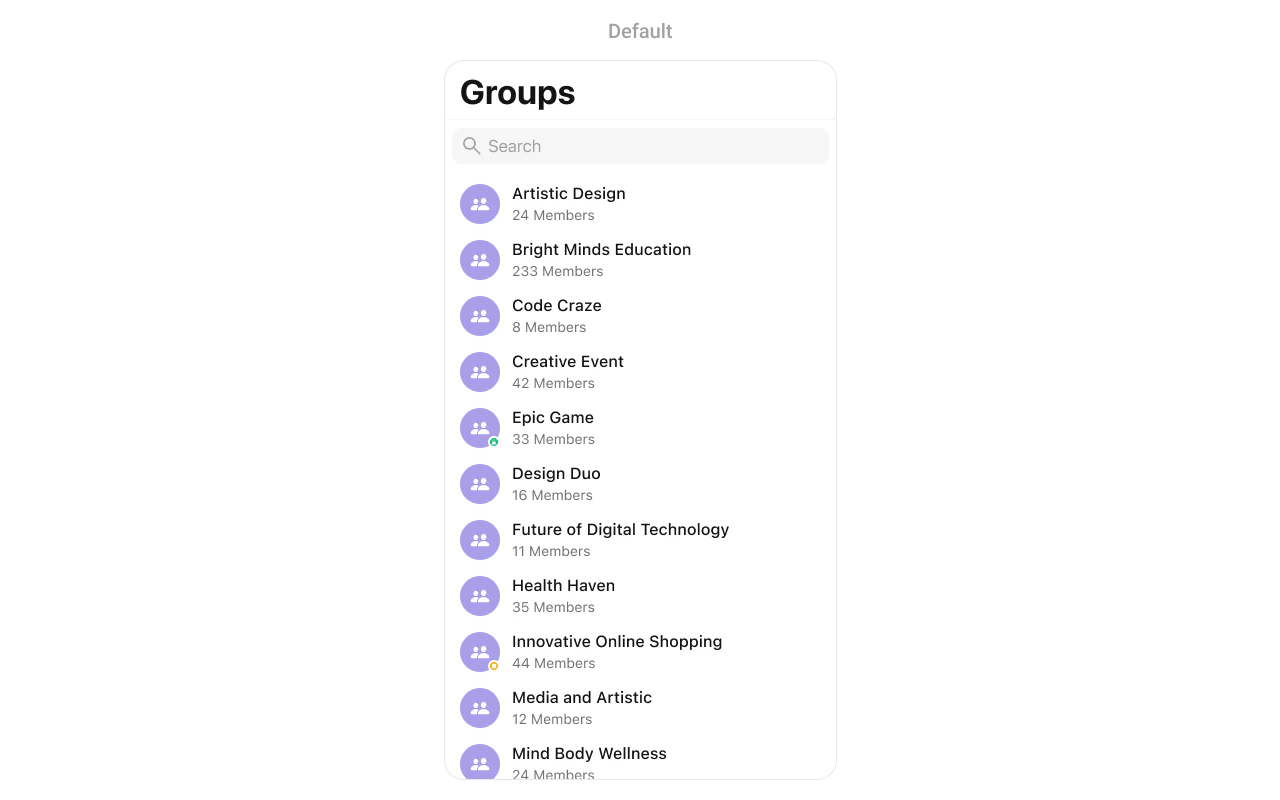
CometChatGroups showing a searchable list of groups with avatars, names, member counts, and group type indicators
{
  "component": "CometChatGroups",
  "package": "CometChatUIKitSwift",
  "import": "import CometChatUIKitSwift\nimport CometChatSDK",
  "description": "Displays a searchable list of all available groups with avatars, names, member counts, and group type indicators.",
  "inherits": "UIViewController",
  "primaryOutput": {
    "callback": "onItemClick",
    "type": "(Group, IndexPath) -> Void"
  },
  "props": {
    "data": {
      "groupsRequestBuilder": {
        "type": "GroupsRequest.GroupsRequestBuilder?",
        "default": "nil",
        "note": "Custom request builder for filtering groups"
      },
      "searchRequestBuilder": {
        "type": "GroupsRequest.GroupsRequestBuilder?",
        "default": "nil",
        "note": "Custom request builder for search"
      }
    },
    "callbacks": {
      "onItemClick": "(Group, IndexPath) -> Void",
      "onItemLongClick": "(Group, IndexPath) -> Void",
      "onBack": "() -> Void",
      "onSelection": "([Group]) -> Void",
      "onSelectedItemProceed": "([Group]) -> Void",
      "onError": "(CometChatException) -> Void",
      "onEmpty": "() -> Void",
      "onLoad": "([Group]) -> Void"
    },
    "visibility": {
      "hideSearch": { "type": "Bool", "default": false },
      "hideNavigationBar": { "type": "Bool", "default": false },
      "hideBackButton": { "type": "Bool", "default": false },
      "hideGroupType": { "type": "Bool", "default": false },
      "hideSectionHeader": { "type": "Bool", "default": false },
      "hideErrorView": { "type": "Bool", "default": false },
      "hideLoadingState": { "type": "Bool", "default": false }
    },
    "selection": {
      "selectionMode": { "type": "SelectionMode", "default": ".none" },
      "selectionLimit": { "type": "Int", "default": 0 },
      "selectedCellCount": { "type": "Int", "default": 0 }
    },
    "styling": {
      "avatarStyle": { "type": "AvatarStyle", "default": "AvatarStyle()" },
      "statusIndicatorStyle": { "type": "StatusIndicatorStyle", "default": "StatusIndicatorStyle()" }
    },
    "viewSlots": {
      "listItemView": "(Group) -> UIView",
      "leadingView": "(Group) -> UIView",
      "titleView": "(Group?) -> UIView",
      "subtitleView": "(Group?) -> UIView",
      "trailingView": "(Group?) -> UIView",
      "emptyStateView": "() -> UIView",
      "errorStateView": "() -> UIView",
      "loadingStateView": "() -> UIView"
    }
  },
  "events": [
    {
      "name": "ccGroupCreated",
      "payload": "Group",
      "description": "Fires when a group is created"
    },
    {
      "name": "ccGroupDeleted",
      "payload": "Group",
      "description": "Fires when a group is deleted"
    },
    {
      "name": "ccGroupMemberJoined",
      "payload": "{ user: User, group: Group }",
      "description": "Fires when a user joins a group"
    },
    {
      "name": "ccGroupMemberLeft",
      "payload": "{ user: User, group: Group }",
      "description": "Fires when a user leaves a group"
    }
  ],
  "sdkListeners": [
    "onGroupMemberJoined",
    "onGroupMemberLeft",
    "onGroupMemberKicked",
    "onGroupMemberBanned",
    "onGroupMemberUnbanned",
    "onGroupMemberScopeChanged",
    "onMemberAddedToGroup"
  ],
  "compositionExample": {
    "description": "Groups list for browsing and joining group conversations",
    "components": ["CometChatGroups", "CometChatMessages"],
    "flow": "User taps on a group → onItemClick fires → Navigate to CometChatMessages with selected group"
  },
  "types": {
    "Group": {
      "guid": "String",
      "name": "String",
      "icon": "String?",
      "membersCount": "Int",
      "groupType": "GroupType",
      "scope": "MemberScope?"
    },
    "GroupType": {
      "public": "Anyone can join",
      "private": "Invite only",
      "password": "Password protected"
    }
  }
}
FieldValue
ComponentCometChatGroups
PackageCometChatUIKitSwift
InheritsUIViewController

Where It Fits

CometChatGroups displays all available groups for browsing and joining. It’s typically used as a standalone screen or within a tab view controller.
import UIKit
import CometChatUIKitSwift
import CometChatSDK

class GroupsViewController: UIViewController {
    
    override func viewDidLoad() {
        super.viewDidLoad()
        setupGroups()
    }
    
    private func setupGroups() {
        let groupsController = CometChatGroups()
        
        // Handle group selection - open group chat
        groupsController.set(onItemClick: { [weak self] group, indexPath in
            self?.openGroupChat(group)
        })
        
        let navController = UINavigationController(rootViewController: groupsController)
        present(navController, animated: true)
    }
    
    private func openGroupChat(_ group: Group) {
        let messagesVC = CometChatMessages()
        messagesVC.set(group: group)
        navigationController?.pushViewController(messagesVC, animated: true)
    }
}
CometChatGroups showing integration with navigation controller and group selection handling

Minimal Render

import CometChatUIKitSwift

let groups = CometChatGroups()
let navController = UINavigationController(rootViewController: groups)
present(navController, animated: true)
CometChatGroups showing minimal render with default configuration displaying group list

Filtering

Use GroupsRequest.GroupsRequestBuilder to filter which groups appear in the list. The builder pattern allows chaining multiple filter conditions.
import CometChatUIKitSwift
import CometChatSDK

// Create a custom request builder
let groupsRequestBuilder = GroupsRequest.GroupsRequestBuilder(limit: 30)
    .set(joinedOnly: true)

let groups = CometChatGroups(groupsRequestBuilder: groupsRequestBuilder)

Filter Recipes

RecipeCode
Joined groups only.set(joinedOnly: true)
Search by name.set(searchKeyword: "design")
Filter by tags.set(tags: ["engineering", "marketing"])
Include tag info.set(withTags: true)
Limit resultsGroupsRequestBuilder(limit: 20)

Actions and Events

Callback Props

onItemClick

Fires when a user taps on a group in the list. Use this to open the group chat.
import CometChatUIKitSwift
import CometChatSDK

let groups = CometChatGroups()

groups.set(onItemClick: { [weak self] group, indexPath in
    guard let self = self else { return }
    
    let messagesVC = CometChatMessages()
    messagesVC.set(group: group)
    self.navigationController?.pushViewController(messagesVC, animated: true)
})

onItemLongClick

Fires when a user long-presses on a group. Use this to show additional options.
import CometChatUIKitSwift
import CometChatSDK

let groups = CometChatGroups()

groups.set(onItemLongClick: { [weak self] group, indexPath in
    guard let self = self else { return }
    
    let alert = UIAlertController(title: group.name, message: nil, preferredStyle: .actionSheet)
    
    alert.addAction(UIAlertAction(title: "View Details", style: .default) { _ in
        // View group details
    })
    
    alert.addAction(UIAlertAction(title: "Leave Group", style: .destructive) { _ in
        // Leave group
    })
    
    alert.addAction(UIAlertAction(title: "Cancel", style: .cancel))
    self.present(alert, animated: true)
})

onBack

Fires when the back button is pressed.
import CometChatUIKitSwift

let groups = CometChatGroups()

groups.set(onBack: { [weak self] in
    self?.navigationController?.popViewController(animated: true)
})

onSelection

Fires when groups are selected in selection mode.
import CometChatUIKitSwift
import CometChatSDK

let groups = CometChatGroups()
groups.selectionMode = .multiple

groups.set(onSelection: { [weak self] selectedGroups in
    print("Selected \(selectedGroups.count) groups")
})

onSelectedItemProceed

Fires when the user confirms their selection by tapping the proceed/submit button. Use this to handle the final selection action.
import CometChatUIKitSwift
import CometChatSDK

let groups = CometChatGroups()
groups.selectionMode = .multiple
groups.selectionLimit = 5

groups.onSelectedItemProceed = { [weak self] selectedGroups in
    guard let self = self else { return }
    
    // Handle the selected groups
    for group in selectedGroups {
        print("Selected group: \(group.name ?? "")")
    }
    
    // Proceed with the selection
    self.processSelectedGroups(selectedGroups)
}

onError

Fires when an error occurs while loading groups.
import CometChatUIKitSwift

let groups = CometChatGroups()

groups.set(onError: { error in
    print("Error loading groups: \(error.errorDescription)")
})

onEmpty

Fires when the group list is empty.
import CometChatUIKitSwift

let groups = CometChatGroups()

groups.set(onEmpty: {
    print("No groups found")
})

onLoad

Fires when groups are successfully loaded.
import CometChatUIKitSwift
import CometChatSDK

let groups = CometChatGroups()

groups.set(onLoad: { groups in
    print("Loaded \(groups.count) groups")
})

Actions Reference

MethodDescriptionExample
set(onItemClick:)Triggered when a group is tappedOpen group chat
set(onItemLongClick:)Triggered on long pressShow options menu
set(onBack:)Triggered when back button is pressedCustom navigation
set(onSelection:)Triggered in selection modeMulti-select groups
onSelectedItemProceedTriggered when selection is confirmedProcess selected groups
set(onError:)Triggered when an error occursShow error alert
set(onEmpty:)Triggered when list is emptyShow empty state
set(onLoad:)Triggered when groups loadAnalytics tracking

Global UI Events

EventFires whenPayload
ccGroupCreatedA group is createdGroup
ccGroupDeletedA group is deletedGroup
ccGroupMemberJoinedA user joins a groupUser, Group
ccGroupMemberLeftA user leaves a groupUser, Group
import CometChatUIKitSwift
import CometChatSDK

class MyViewController: UIViewController, CometChatGroupEventListener {
    
    override func viewDidLoad() {
        super.viewDidLoad()
        CometChatGroupEvents.addListener("my-listener", self)
    }
    
    override func viewWillDisappear(_ animated: Bool) {
        super.viewWillDisappear(animated)
        CometChatGroupEvents.removeListener("my-listener")
    }
    
    func onGroupCreate(group: Group) {
        print("Group created: \(group.name ?? "")")
    }
    
    func onGroupDelete(group: Group) {
        print("Group deleted: \(group.name ?? "")")
    }
    
    func onGroupMemberJoin(joinedUser: User, joinedGroup: Group) {
        print("\(joinedUser.name ?? "") joined \(joinedGroup.name ?? "")")
    }
    
    func onGroupMemberLeave(leftUser: User, leftGroup: Group) {
        print("\(leftUser.name ?? "") left \(leftGroup.name ?? "")")
    }
}

SDK Events (Real-Time, Automatic)

SDK ListenerInternal behavior
onGroupMemberJoinedUpdates member count
onGroupMemberLeftUpdates member count
onGroupMemberKickedUpdates member count
onGroupMemberBannedUpdates member count
onGroupMemberUnbannedUpdates group info
onGroupMemberScopeChangedUpdates member scope
onMemberAddedToGroupUpdates member count

Custom View Slots

SlotSignatureReplaces
listItemView(Group) -> UIViewEntire group row
leadingView(Group) -> UIViewAvatar / left section
titleView(Group?) -> UIViewName / title text
subtitleView(Group?) -> UIViewMember count / subtitle
trailingView(Group?) -> UIViewRight side content
emptyStateView() -> UIViewEmpty state display
errorStateView() -> UIViewError state display
loadingStateView() -> UIViewLoading state display

listItemView

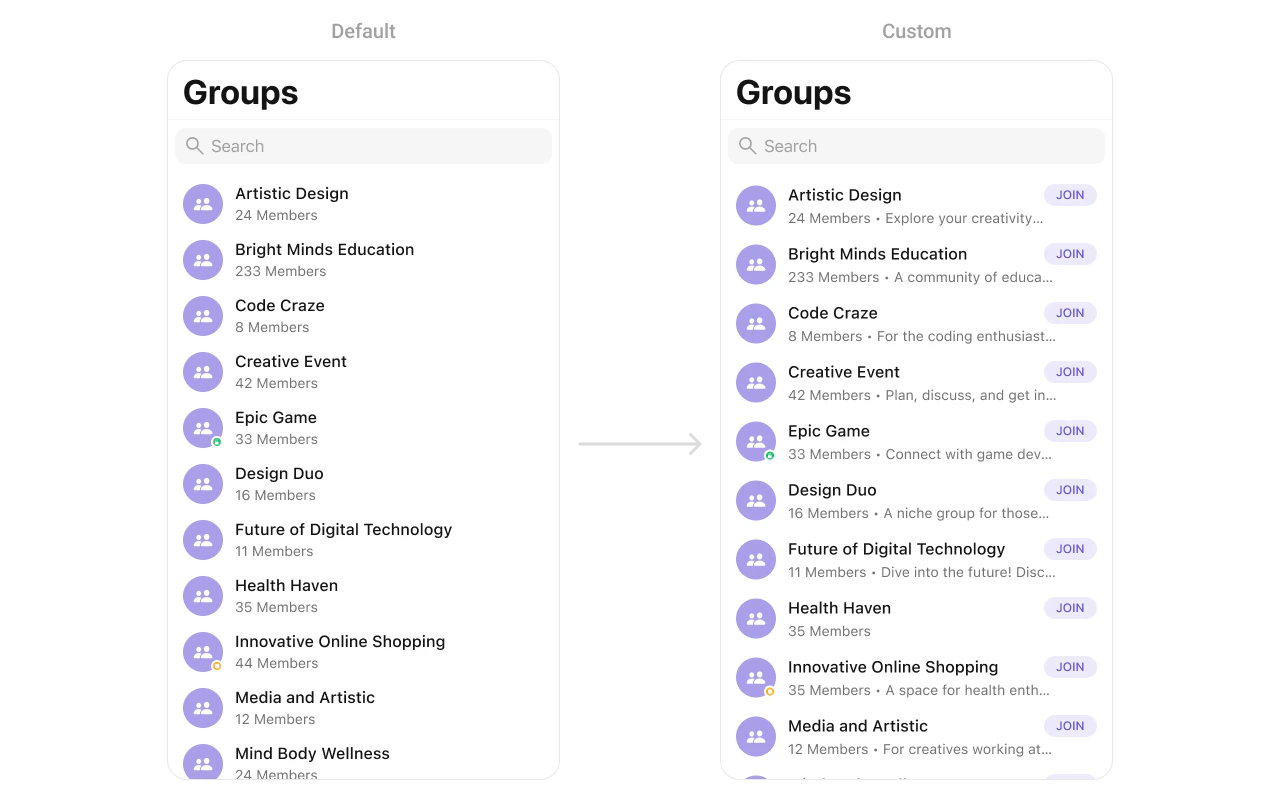
Replace the entire group row with a custom design.
import UIKit
import CometChatUIKitSwift
import CometChatSDK

let groups = CometChatGroups()

groups.set(listItemView: { group in
    let customView = CustomGroupCell()
    customView.configure(with: group)
    return customView
})
CometChatGroups with custom listItemView showing customized group row with avatar, title, member count, and join button
You can create a CustomGroupCell as a custom UIView:
import UIKit
import CometChatSDK

class CustomGroupCell: UIView {
    
    private let avatarImageView: UIImageView = {
        let imageView = UIImageView()
        imageView.translatesAutoresizingMaskIntoConstraints = false
        imageView.contentMode = .scaleAspectFill
        imageView.layer.cornerRadius = 20
        imageView.clipsToBounds = true
        imageView.backgroundColor = .systemGray5
        return imageView
    }()
    
    private let titleLabel: UILabel = {
        let label = UILabel()
        label.translatesAutoresizingMaskIntoConstraints = false
        label.font = .systemFont(ofSize: 16, weight: .semibold)
        label.textColor = .label
        return label
    }()
    
    private let membersLabel: UILabel = {
        let label = UILabel()
        label.translatesAutoresizingMaskIntoConstraints = false
        label.font = .systemFont(ofSize: 14)
        label.textColor = .secondaryLabel
        return label
    }()
    
    private let joinButton: UIButton = {
        let button = UIButton(type: .system)
        button.translatesAutoresizingMaskIntoConstraints = false
        button.setTitle("JOIN", for: .normal)
        button.titleLabel?.font = .systemFont(ofSize: 12, weight: .bold)
        button.layer.cornerRadius = 12
        button.layer.borderWidth = 1
        button.layer.borderColor = UIColor.systemBlue.cgColor
        return button
    }()
    
    override init(frame: CGRect) {
        super.init(frame: frame)
        setupView()
    }
    
    required init?(coder: NSCoder) {
        super.init(coder: coder)
        setupView()
    }
    
    private func setupView() {
        addSubview(avatarImageView)
        addSubview(titleLabel)
        addSubview(membersLabel)
        addSubview(joinButton)
        
        NSLayoutConstraint.activate([
            avatarImageView.leadingAnchor.constraint(equalTo: leadingAnchor, constant: 16),
            avatarImageView.centerYAnchor.constraint(equalTo: centerYAnchor),
            avatarImageView.widthAnchor.constraint(equalToConstant: 40),
            avatarImageView.heightAnchor.constraint(equalToConstant: 40),
            
            titleLabel.leadingAnchor.constraint(equalTo: avatarImageView.trailingAnchor, constant: 12),
            titleLabel.topAnchor.constraint(equalTo: topAnchor, constant: 12),
            titleLabel.trailingAnchor.constraint(lessThanOrEqualTo: joinButton.leadingAnchor, constant: -8),
            
            membersLabel.leadingAnchor.constraint(equalTo: avatarImageView.trailingAnchor, constant: 12),
            membersLabel.topAnchor.constraint(equalTo: titleLabel.bottomAnchor, constant: 4),
            membersLabel.bottomAnchor.constraint(equalTo: bottomAnchor, constant: -12),
            
            joinButton.trailingAnchor.constraint(equalTo: trailingAnchor, constant: -16),
            joinButton.centerYAnchor.constraint(equalTo: centerYAnchor),
            joinButton.widthAnchor.constraint(equalToConstant: 60),
            joinButton.heightAnchor.constraint(equalToConstant: 24)
        ])
    }
    
    func configure(with group: Group) {
        titleLabel.text = group.name
        membersLabel.text = "\(group.membersCount) members"
        
        if let iconURL = group.icon, let url = URL(string: iconURL) {
            URLSession.shared.dataTask(with: url) { [weak self] data, _, _ in
                if let data = data, let image = UIImage(data: data) {
                    DispatchQueue.main.async {
                        self?.avatarImageView.image = image
                    }
                }
            }.resume()
        }
        
        let isJoined = group.hasJoined
        joinButton.setTitle(isJoined ? "JOINED" : "JOIN", for: .normal)
        joinButton.setTitleColor(isJoined ? .systemGray : .systemBlue, for: .normal)
        joinButton.layer.borderColor = isJoined ? UIColor.systemGray.cgColor : UIColor.systemBlue.cgColor
    }
}

leadingView

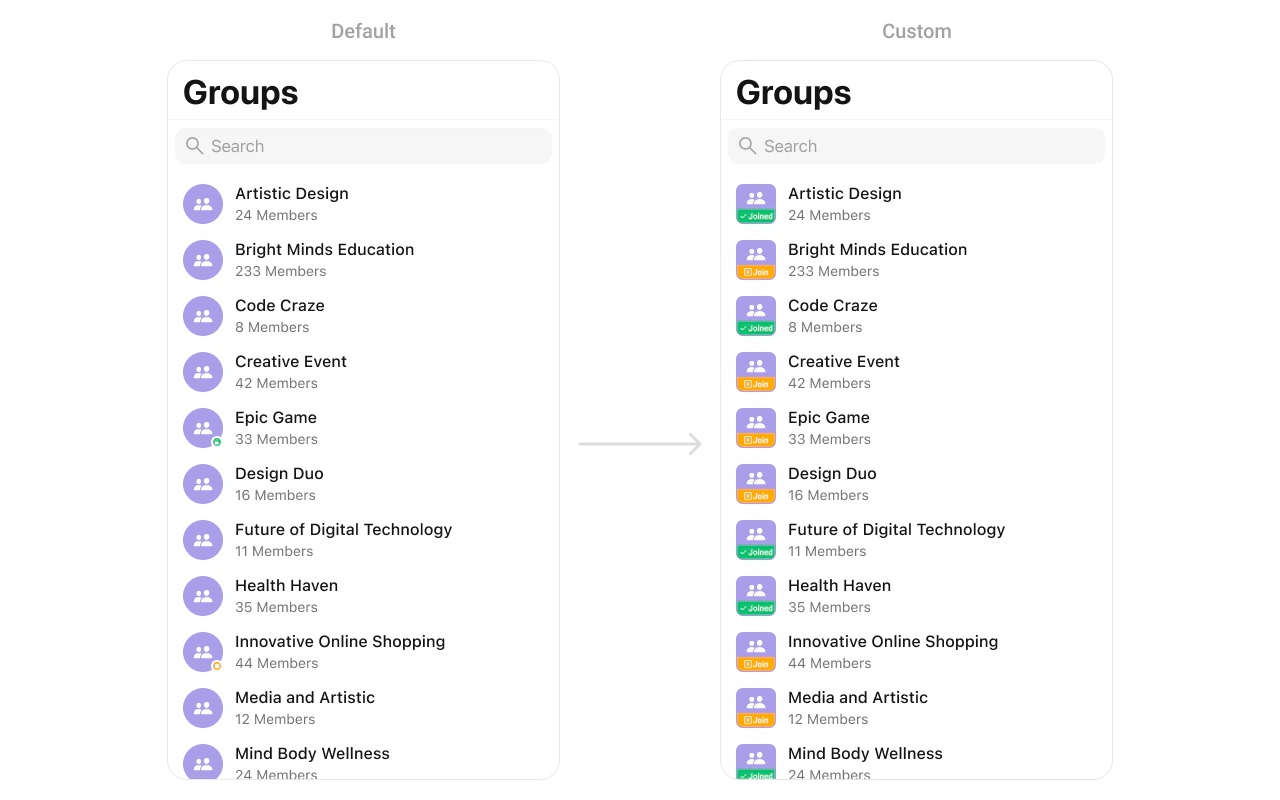
Customize the leading view (avatar area) of a group cell.
import UIKit
import CometChatUIKitSwift
import CometChatSDK

let groups = CometChatGroups()

groups.set(leadingView: { group in
    let view = CustomLeadingView()
    return view
})
CometChatGroups with custom leadingView showing customized avatar area with icon and join button
You can create a CustomLeadingView as a custom UIView:
import UIKit

class CustomLeadingView: UIView {

    private let iconImageView: UIImageView = {
        let imageView = UIImageView(image: UIImage(systemName: "person.2.fill"))
        imageView.tintColor = .white
        imageView.contentMode = .scaleAspectFit
        return imageView
    }()

    private let joinButton: UIButton = {
        let button = UIButton()
        button.setTitle("Join", for: .normal)
        button.setTitleColor(.white, for: .normal)
        button.titleLabel?.font = UIFont.systemFont(ofSize: 14, weight: .bold)
        button.backgroundColor = .orange
        button.layer.cornerRadius = 8
        return button
    }()

    override init(frame: CGRect) {
        super.init(frame: frame)
        setupView()
    }

    required init?(coder: NSCoder) {
        fatalError("init(coder:) has not been implemented")
    }

    private func setupView() {
        backgroundColor = .purple
        layer.cornerRadius = 12

        addSubview(iconImageView)
        addSubview(joinButton)

        iconImageView.translatesAutoresizingMaskIntoConstraints = false
        joinButton.translatesAutoresizingMaskIntoConstraints = false
    }
}

titleView

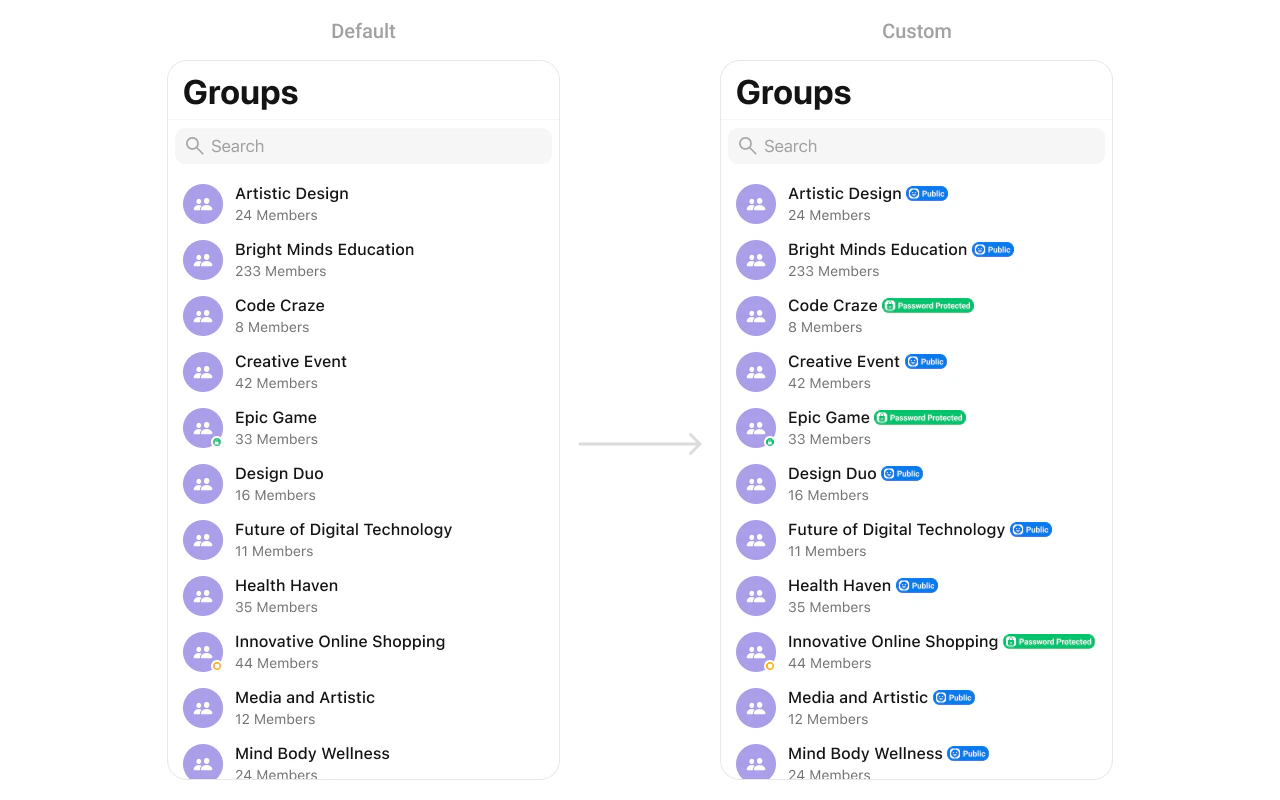
Customize the title view of a group cell.
import UIKit
import CometChatUIKitSwift
import CometChatSDK

let groups = CometChatGroups()

groups.set(titleView: { group in
    let view = CustomTitleView()
    return view
})
CometChatGroups with custom titleView showing group name with public badge indicator
You can create a CustomTitleView as a custom UIView:
import UIKit

class CustomTitleView: UIView {

    private let titleLabel: UILabel = {
        let label = UILabel()
        label.text = "Artistic Design"
        label.font = UIFont.systemFont(ofSize: 16, weight: .medium)
        label.textColor = .black
        return label
    }()

    private let publicBadge: UIView = {
        let view = UIView()
        view.backgroundColor = .blue
        view.layer.cornerRadius = 10

        let icon = UIImageView(image: UIImage(systemName: "person.3.fill"))
        icon.tintColor = .white
        icon.contentMode = .scaleAspectFit

        let label = UILabel()
        label.text = "Public"
        label.font = UIFont.systemFont(ofSize: 12, weight: .bold)
        label.textColor = .white

        let stackView = UIStackView(arrangedSubviews: [icon, label])
        stackView.spacing = 4
        stackView.alignment = .center
        stackView.translatesAutoresizingMaskIntoConstraints = false

        view.addSubview(stackView)

        NSLayoutConstraint.activate([
            stackView.centerXAnchor.constraint(equalTo: view.centerXAnchor),
            stackView.centerYAnchor.constraint(equalTo: view.centerYAnchor),
            view.widthAnchor.constraint(equalToConstant: 60),
            view.heightAnchor.constraint(equalToConstant: 20)
        ])
        
        return view
    }()

    override init(frame: CGRect) {
        super.init(frame: frame)
        setupView()
    }

    required init?(coder: NSCoder) {
        fatalError("init(coder:) has not been implemented")
    }

    private func setupView() {
        addSubview(titleLabel)
        addSubview(publicBadge)

        titleLabel.translatesAutoresizingMaskIntoConstraints = false
        publicBadge.translatesAutoresizingMaskIntoConstraints = false

        NSLayoutConstraint.activate([
            titleLabel.leadingAnchor.constraint(equalTo: leadingAnchor),
            titleLabel.centerYAnchor.constraint(equalTo: centerYAnchor),

            publicBadge.leadingAnchor.constraint(equalTo: titleLabel.trailingAnchor, constant: 6),
            publicBadge.centerYAnchor.constraint(equalTo: centerYAnchor)
        ])
    }
}

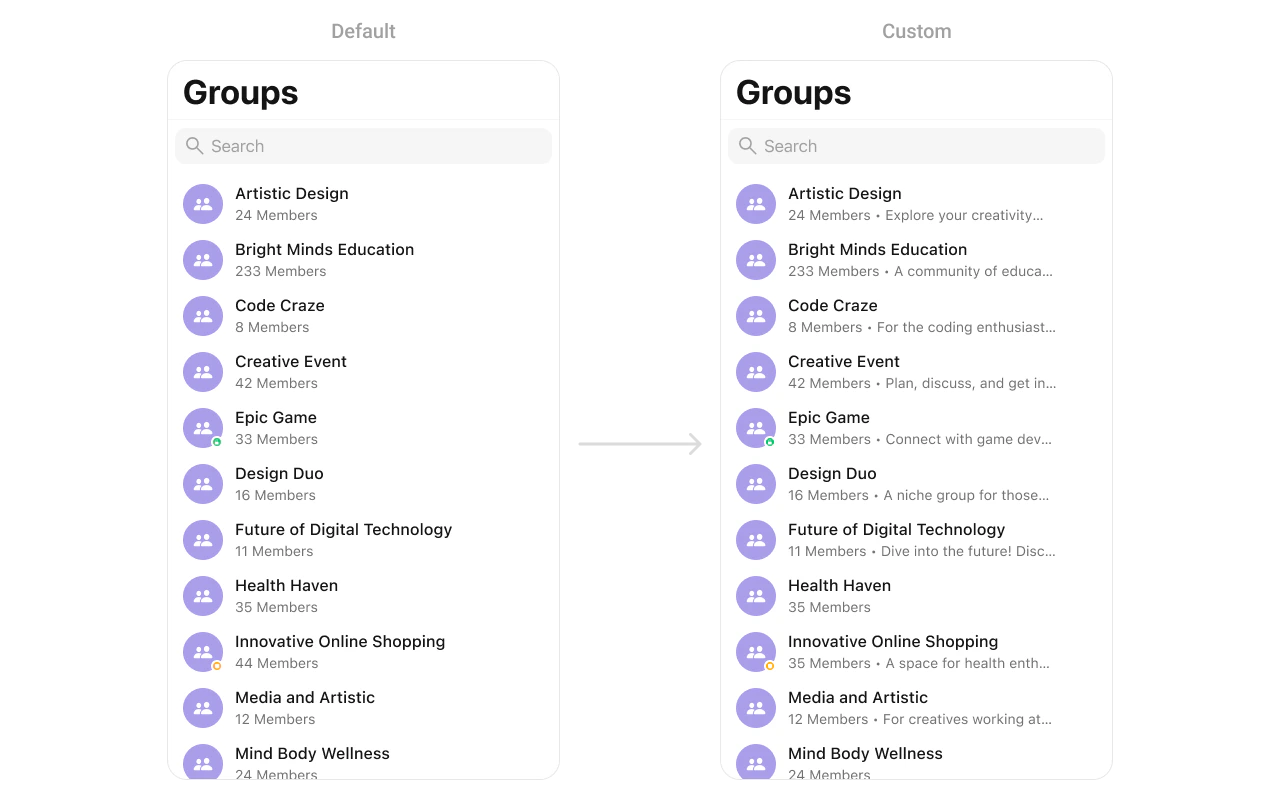
subtitleView

Customize the subtitle area below the group name.
import UIKit
import CometChatUIKitSwift
import CometChatSDK

let groups = CometChatGroups()

groups.set(subtitleView: { group in
    let view = CustomSubtitleView(membersCount: group.membersCount)
    return view
})
CometChatGroups with custom subtitleView showing member count and group description text
You can create a CustomSubtitleView as a custom UIView:
import UIKit

class CustomSubtitleView: UILabel {
    
    init(membersCount: Int) {
        super.init(frame: .zero)
        self.text = "\(membersCount) members • Group description"
        self.textColor = UIColor.gray
        self.font = UIFont.systemFont(ofSize: 14)
        self.numberOfLines = 1
    }
    
    required init?(coder: NSCoder) {
        fatalError("init(coder:) has not been implemented")
    }
}

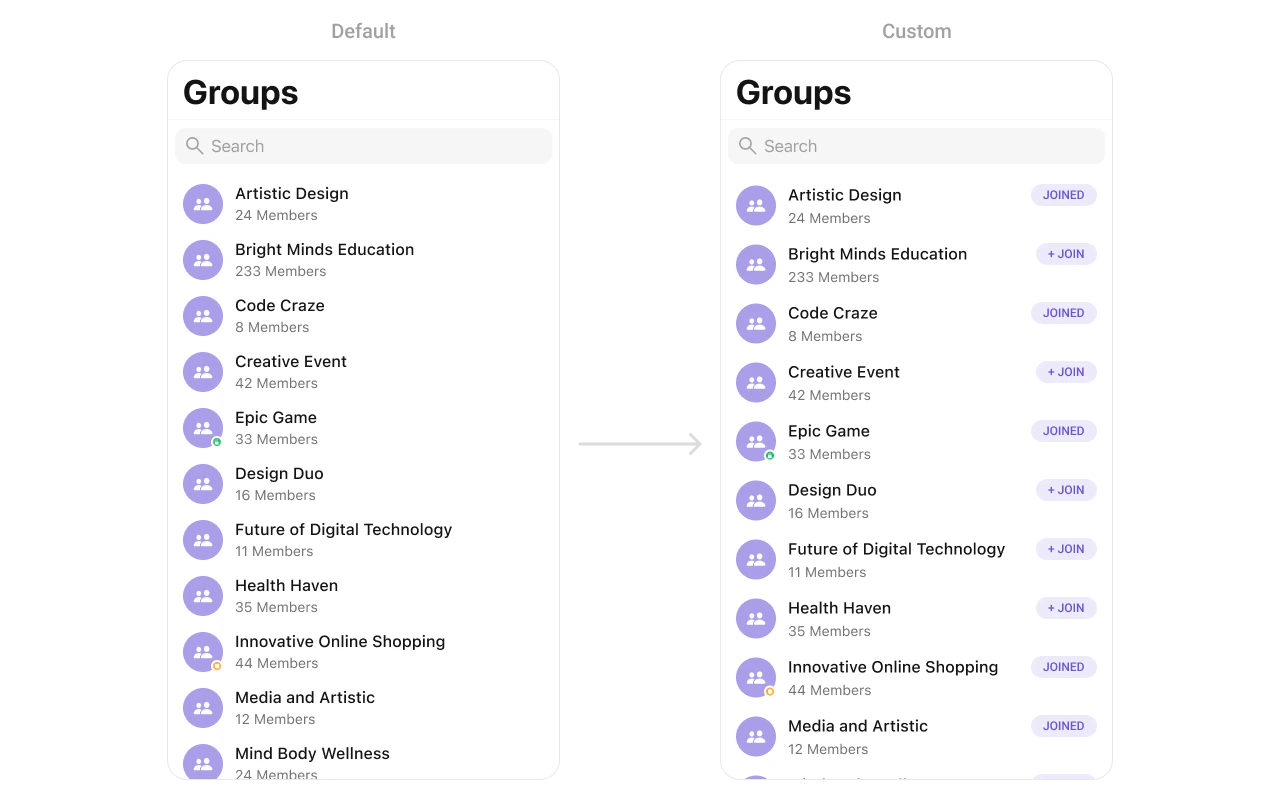
trailingView

Customize the trailing view (right side) of a group cell.
import UIKit
import CometChatUIKitSwift
import CometChatSDK

let groups = CometChatGroups()

groups.set(trailView: { group in
    let view = CustomTrailView()
    return view
})
CometChatGroups with custom trailingView showing joined status badge on the right side
You can create a CustomTrailView as a custom UIView:
import UIKit

class CustomTrailView: UIView {

    private let joinedLabel: UILabel = {
        let label = UILabel()
        label.text = "JOINED"
        label.font = UIFont.systemFont(ofSize: 14, weight: .bold)
        label.textColor = UIColor.purple
        return label
    }()

    override init(frame: CGRect) {
        super.init(frame: frame)
        setupView()
    }

    required init?(coder: NSCoder) {
        fatalError("init(coder:) has not been implemented")
    }

    private func setupView() {
        backgroundColor = UIColor.purple.withAlphaComponent(0.1)
        layer.cornerRadius = 16

        addSubview(joinedLabel)
        joinedLabel.translatesAutoresizingMaskIntoConstraints = false

        NSLayoutConstraint.activate([
            joinedLabel.centerXAnchor.constraint(equalTo: centerXAnchor),
            joinedLabel.centerYAnchor.constraint(equalTo: centerYAnchor),
            widthAnchor.constraint(equalToConstant: 80),
            heightAnchor.constraint(equalToConstant: 32)
        ])
    }
}

loadingStateView

Customize the loading state view displayed while data is being fetched.
import UIKit
import CometChatUIKitSwift

let groups = CometChatGroups()

let loadingIndicator = UIActivityIndicatorView(style: .medium)
loadingIndicator.startAnimating()
groups.set(loadingView: loadingIndicator)

errorStateView

Customize the error state view displayed when an error occurs.
import UIKit
import CometChatUIKitSwift

let groups = CometChatGroups()

let errorLabel = UILabel()
errorLabel.text = "Something went wrong!"
errorLabel.textColor = .red
groups.set(errorView: errorLabel)

emptyStateView

Customize the empty state view displayed when no groups are available.
import UIKit
import CometChatUIKitSwift

let groups = CometChatGroups()

let emptyLabel = UILabel()
emptyLabel.text = "No groups found"
emptyLabel.textColor = .gray
emptyLabel.textAlignment = .center
groups.set(emptyView: emptyLabel)

Options

set(options:)

Define custom swipe options for each group. This method allows you to return an array of CometChatGroupOption based on the group object. These options appear when the user swipes on a group cell.
import CometChatUIKitSwift
import CometChatSDK

let groups = CometChatGroups()

groups.set(options: { group in
    // Create a custom delete option
    let deleteOption = CometChatGroupOption(
        id: "delete",
        title: "Delete",
        icon: UIImage(systemName: "trash"),
        backgroundColor: .systemRed,
        onClick: { group, section, option, controller in
            // Handle delete action
            print("Delete group: \(group.name ?? "")")
        }
    )
    
    // Create a custom mute option
    let muteOption = CometChatGroupOption(
        id: "mute",
        title: "Mute",
        icon: UIImage(systemName: "bell.slash"),
        backgroundColor: .systemOrange,
        onClick: { group, section, option, controller in
            // Handle mute action
            print("Mute group: \(group.name ?? "")")
        }
    )
    
    return [deleteOption, muteOption]
})

add(options:)

Dynamically add additional swipe options to groups while preserving the default options. This method lets you return additional CometChatGroupOption elements that will be appended to the existing options.
import CometChatUIKitSwift
import CometChatSDK

let groups = CometChatGroups()

groups.add(options: { group in
    // Add a custom archive option
    let archiveOption = CometChatGroupOption(
        id: "archive",
        title: "Archive",
        icon: UIImage(systemName: "archivebox"),
        backgroundColor: .systemBlue,
        onClick: { group, section, option, controller in
            // Handle archive action
            print("Archive group: \(group.name ?? "")")
        }
    )
    
    return [archiveOption]
})

Data Manipulation Methods

showJoiningGroupAlert(for:)

Displays an alert dialog when a user attempts to join a password-protected group. This method shows a prompt for the user to enter the group password.
public func showJoiningGroupAlert(for group: Group)
ParameterTypeDescription
groupGroupThe password-protected group to join
import CometChatUIKitSwift
import CometChatSDK

let groups = CometChatGroups()

// Show joining alert for a password-protected group
groups.set(onItemClick: { [weak self] group, indexPath in
    if group.groupType == .password && !group.hasJoined {
        self?.groups.showJoiningGroupAlert(for: group)
    } else {
        // Navigate to group chat
    }
})

hideJoiningGroupAlert(completion:)

Dismisses the joining group alert dialog programmatically. Use this when you need to close the alert without user interaction.
public func hideJoiningGroupAlert(completion: (() -> Void)? = nil)
ParameterTypeDescription
completion(() -> Void)?Optional closure called after the alert is dismissed
import CometChatUIKitSwift

let groups = CometChatGroups()

// Hide the joining alert with a completion handler
groups.hideJoiningGroupAlert {
    print("Alert dismissed")
}

Styling

Style Hierarchy

  1. Global styles (CometChatGroups.style) apply to all instances
  2. Instance styles override global for specific instances

Global Level Styling

import UIKit
import CometChatUIKitSwift

// Apply global styles that affect all CometChatGroups instances
CometChatGroups.style.backgroundColor = UIColor.systemBackground
CometChatGroups.style.titleColor = UIColor.label
CometChatGroups.style.titleFont = UIFont.systemFont(ofSize: 34, weight: .bold)
CometChatGroups.style.listItemTitleTextColor = UIColor.label
CometChatGroups.style.listItemSubTitleTextColor = UIColor.secondaryLabel

// Custom avatar style
let avatarStyle = AvatarStyle()
avatarStyle.cornerRadius = CometChatCornerStyle(cornerRadius: 8)
CometChatGroups.avatarStyle = avatarStyle

Instance Level Styling

import UIKit
import CometChatUIKitSwift

// Create a custom style for a specific instance
var customStyle = GroupsStyle()
customStyle.backgroundColor = UIColor(red: 0.95, green: 0.95, blue: 0.97, alpha: 1.0)
customStyle.titleColor = UIColor.darkGray
customStyle.listItemBackground = UIColor.white

let groups = CometChatGroups()
groups.style = customStyle

Key Style Properties

PropertyTypeDefaultDescription
backgroundColorUIColorCometChatTheme.backgroundColor01Background color
titleColorUIColorCometChatTheme.textColorPrimaryNavigation title color
titleFontUIFontCometChatTypography.Heading4.mediumNavigation title font
listItemTitleTextColorUIColorCometChatTheme.textColorPrimaryGroup name color
listItemTitleFontUIFontCometChatTypography.Heading4.mediumGroup name font
listItemSubTitleTextColorUIColorCometChatTheme.textColorSecondaryMember count color
listItemSubTitleFontUIFontCometChatTypography.Body.regularMember count font
listItemBackgroundUIColor.clearList item background
privateGroupBadgeColorUIColorCometChatTheme.iconColorSecondaryPrivate group badge color
passwordGroupBadgeColorUIColorCometChatTheme.iconColorSecondaryPassword group badge color

Customization Matrix

What to changeWhereProperty/APIExample
Background colorStylebackgroundColorUIColor.systemBackground
Title appearanceStyletitleColor, titleFontCustom colors and fonts
List item lookStylelistItemBackgroundUIColor.white
Avatar appearanceStyleavatarStyleAvatarStyle() with custom radius
Group type badgesStyleprivateGroupBadgeColorCustom badge colors
Hide searchPropertyhideSearchgroups.hideSearch = true
Hide group typePropertyhideGroupTypegroups.hideGroupType = true
Custom rowView Slotset(listItemView:)See Custom View Slots

Props

All props are optional. Sorted alphabetically.

avatarStyle

Customizes the appearance of avatars in group list items.
TypeAvatarStyle
DefaultAvatarStyle()
import CometChatUIKitSwift

let groups = CometChatGroups()

let avatarStyle = AvatarStyle()
avatarStyle.backgroundColor = UIColor.systemBlue
avatarStyle.cornerRadius = CometChatCornerStyle(cornerRadius: 8)
avatarStyle.borderWidth = 1
avatarStyle.borderColor = UIColor.systemGray4

groups.set(avatarStyle: avatarStyle)

groupsRequestBuilder

Custom request builder for filtering groups.
TypeGroupsRequest.GroupsRequestBuilder?
Defaultnil

hideBackButton

Hides the back button in the navigation bar.
TypeBool
Defaultfalse

hideErrorView

Hides the error state view.
TypeBool
Defaultfalse

hideGroupType

Hides the public/private/password group type icons.
TypeBool
Defaultfalse

hideLoadingState

Hides the loading state indicator.
TypeBool
Defaultfalse

hideNavigationBar

Hides the entire navigation bar.
TypeBool
Defaultfalse

hideSearch

Hides the search bar.
TypeBool
Defaultfalse

hideSectionHeader

Hides the alphabetical section headers.
TypeBool
Defaultfalse

searchRequestBuilder

Custom request builder for search functionality.
TypeGroupsRequest.GroupsRequestBuilder?
Defaultnil

selectedCellCount

Returns the count of currently selected groups when in selection mode.
TypeInt
Default0
import CometChatUIKitSwift

let groups = CometChatGroups()
groups.selectionMode = .multiple

// Get the count of selected groups
let selectedCount = groups.selectedCellCount
print("Selected \(selectedCount) groups")

selectionLimit

Sets the maximum number of groups that can be selected in selection mode. When the limit is reached, further selections are disabled.
TypeInt
Default0 (unlimited)
import CometChatUIKitSwift

let groups = CometChatGroups()
groups.selectionMode = .multiple

// Limit selection to 5 groups
groups.selectionLimit = 5

// Handle selection confirmation
groups.onSelectedItemProceed = { selectedGroups in
    print("Selected \(selectedGroups.count) groups")
    
    // Process the selected groups
    for group in selectedGroups {
        print("Group: \(group.name ?? "")")
    }
}

selectionMode

Sets the selection mode for multi-select functionality.
TypeSelectionMode
Default.none

statusIndicatorStyle

Customizes the appearance of group type status indicators.
TypeStatusIndicatorStyle
DefaultStatusIndicatorStyle()
import CometChatUIKitSwift

let groups = CometChatGroups()

let statusIndicatorStyle = StatusIndicatorStyle()
statusIndicatorStyle.backgroundColor = UIColor.systemGreen
statusIndicatorStyle.borderWidth = 2
statusIndicatorStyle.borderColor = UIColor.white

groups.set(statusIndicatorStyle: statusIndicatorStyle)

Events

EventPayloadFires when
ccGroupCreatedGroupA group is created
ccGroupDeletedGroupA group is deleted
ccGroupMemberJoinedUser, GroupA user joins a group
ccGroupMemberLeftUser, GroupA user leaves a group

Common Patterns

Public groups only

let publicBuilder = GroupsRequest.GroupsRequestBuilder(limit: 30)
    .set(groupType: .public)

let groups = CometChatGroups()
groups.set(groupsRequestBuilder: publicBuilder)

Joined groups only

let joinedBuilder = GroupsRequest.GroupsRequestBuilder(limit: 30)
    .set(joinedOnly: true)

let groups = CometChatGroups()
groups.set(groupsRequestBuilder: joinedBuilder)

Custom empty state with CTA

let groups = CometChatGroups()

groups.set(emptyStateView: {
    let emptyView = UIView()
    
    let label = UILabel()
    label.text = "No groups found"
    label.textAlignment = .center
    
    let button = UIButton(type: .system)
    button.setTitle("Create a group", for: .normal)
    
    // Add subviews and constraints...
    return emptyView
})

Hide all chrome — minimal list

let groups = CometChatGroups()
groups.hideSearch = true
groups.hideGroupType = true
groups.hideSectionHeader = true

Multi-select groups

let groups = CometChatGroups()
groups.selectionMode = .multiple

groups.set(onSelection: { selectedGroups in
    print("Selected \(selectedGroups.count) groups")
})