The CometChatSearch component is a powerful and customizable search interface that allows users to search across conversations and messages in real time. It supports a wide variety of filters, scopes, and customization options.
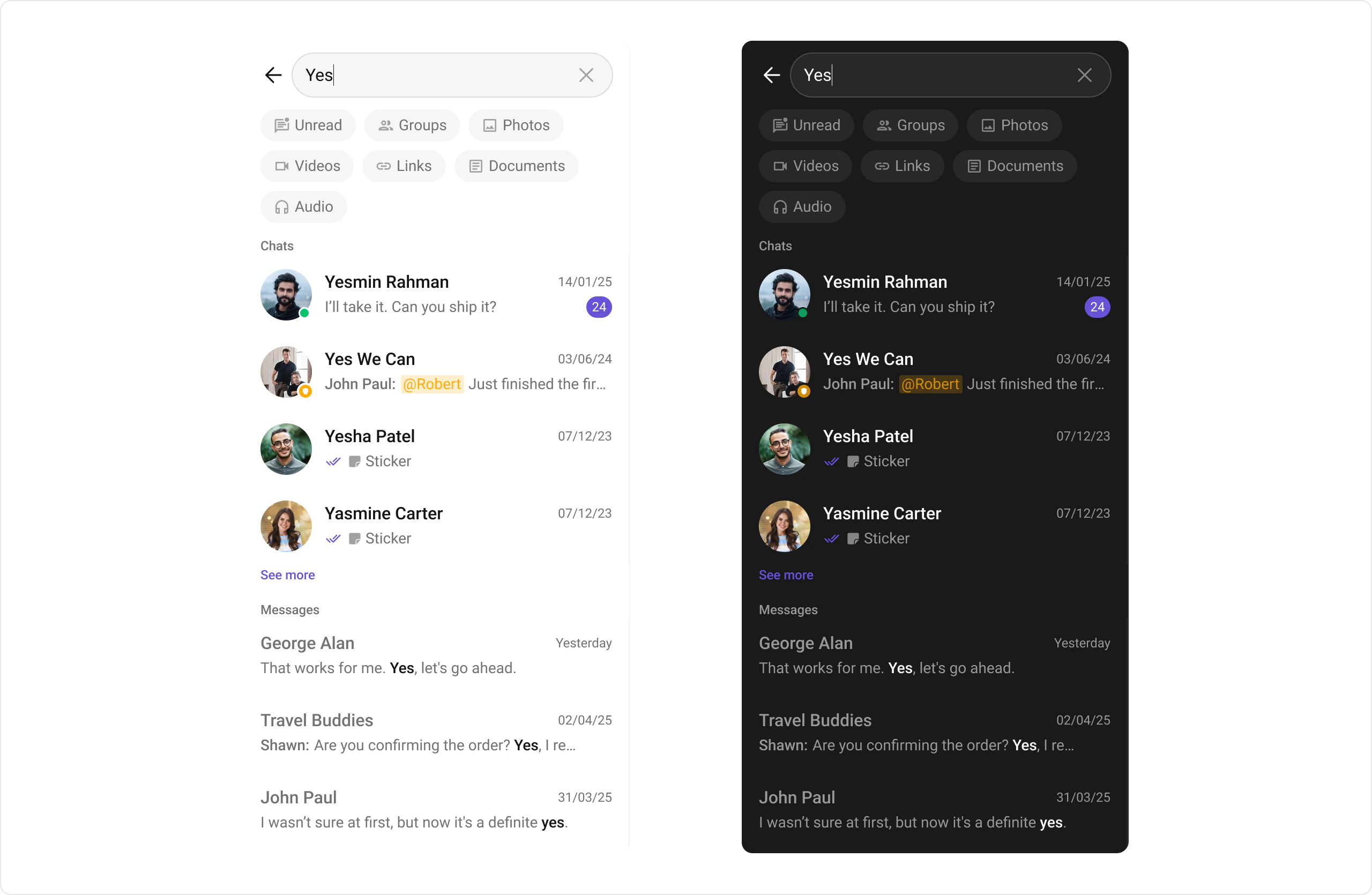
CometChatSearch showing the search interface with search bar, filter options, and search results displaying conversations and messages
{
  "component": "CometChatSearch",
  "package": "CometChatUIKitSwift",
  "import": "import CometChatUIKitSwift\nimport CometChatSDK",
  "description": "Provides search functionality across conversations and messages",
  "inherits": "UIViewController",
  "primaryOutput": {
    "callback": "onMessageClicked",
    "type": "(BaseMessage) -> Void"
  },
  "props": {
    "data": {
      "user": { "type": "User?", "default": "nil", "note": "Limits search to specific user" },
      "group": { "type": "Group?", "default": "nil", "note": "Limits search to specific group" },
      "conversationsRequestBuilder": { "type": "ConversationsRequest.ConversationsRequestBuilder", "default": "SDK default" },
      "messagesRequestBuilder": { "type": "MessagesRequest.MessageRequestBuilder", "default": "SDK default" }
    },
    "callbacks": {
      "onConversationClicked": "(Conversation, IndexPath) -> Void",
      "onMessageClicked": "(BaseMessage) -> Void",
      "onBack": "() -> Void",
      "onError": "(CometChatException) -> Void",
      "onEmpty": "() -> Void"
    },
    "visibility": {
      "hideNavigationBar": { "type": "Bool", "default": false },
      "hideBackButton": { "type": "Bool", "default": false },
      "hideUserStatus": { "type": "Bool", "default": false },
      "hideGroupType": { "type": "Bool", "default": false },
      "hideReceipts": { "type": "Bool", "default": false }
    },
    "search": {
      "searchFilters": { "type": "[SearchFilter]", "default": "All available filters" },
      "initialSearchFilter": { "type": "SearchFilter?", "default": "nil" },
      "searchIn": { "type": "[SearchScope]", "default": "[.conversations, .messages]" }
    },
    "viewSlots": {
      "listItemViewForConversation": "(Conversation) -> UIView",
      "leadingViewForConversation": "(Conversation) -> UIView",
      "titleViewForConversation": "(Conversation) -> UIView",
      "subtitleViewForConversation": "(Conversation) -> UIView",
      "tailViewForConversation": "(Conversation) -> UIView",
      "listItemViewForMessage": "(BaseMessage) -> UIView",
      "leadingViewForMessage": "(BaseMessage) -> UIView",
      "titleViewForMessage": "(BaseMessage) -> UIView",
      "subtitleViewForMessage": "(BaseMessage) -> UIView",
      "trailingViewForMessage": "(BaseMessage) -> UIView",
      "initialView": "UIView",
      "loadingView": "UIView",
      "emptyView": "UIView",
      "errorView": "UIView"
    }
  },
  "events": [],
  "sdkListeners": [],
  "compositionExample": {
    "description": "Search is typically accessed from conversation list or message header",
    "components": ["CometChatConversations", "CometChatSearch", "CometChatMessages"],
    "flow": "User taps search → enters query → taps result → navigates to conversation/message"
  }
}
FieldValue
ComponentCometChatSearch
PackageCometChatUIKitSwift
InheritsUIViewController

Usage

Integration

CometChatSearch is a composite component that offers flexible integration options. It can be launched directly via button clicks or any user-triggered action.
import CometChatUIKitSwift

let search = CometChatSearch()
self.navigationController?.pushViewController(search, animated: true)

Actions

Actions dictate how a component functions. They are divided into two types: Predefined and User-defined. You can override either type to tailor the behavior to fit your specific needs.

1. onConversationClicked

Triggered when you click on a Conversation from the search result. This action doesn’t have a predefined behavior—you can override it using the following code snippet:
import CometChatUIKitSwift

let search = CometChatSearch()
search.onConversationClicked = { conversation, indexPath in
    print("Conversation clicked:", conversation.conversationId)
}

2. onMessageClicked

Triggered when you click on a Message from the search result. This action doesn’t have a predefined behavior—you can override it using the following code snippet:
import CometChatUIKitSwift

let search = CometChatSearch()
search.onMessageClicked = { message in
    print("Message clicked:", message.id)
}

3. onBack

Triggered when you click on the back button of the search component.
import CometChatUIKitSwift

let search = CometChatSearch()
search.onBack = {
    self.navigationController?.popViewController(animated: true)
}

4. onError

Listens for any errors that occur in the Search component. This action doesn’t change the component’s behavior.
import CometChatUIKitSwift

let search = CometChatSearch()
search.set(onError: { error in
    print("Search error:", error.localizedDescription)
})

5. onEmpty

Listens for the empty state of the Search component. This action doesn’t change the component’s behavior.
import CometChatUIKitSwift

let search = CometChatSearch()
search.set(onEmpty: {
    print("No results found")
})

Filters

Filters allow you to customize the data displayed in a list within a Component. You can filter the list based on your specific criteria using RequestBuilders of the Chat SDK.

SearchScope

The SearchScope enum defines what types of content to search:
ValueDescription
.conversationsSearch in conversations
.messagesSearch in messages
import CometChatUIKitSwift

let search = CometChatSearch()

// Search only in messages
search.set(searchIn: [.messages])

// Search in both conversations and messages (default)
search.set(searchIn: [.conversations, .messages])

SearchFilter

The SearchFilter enum defines available filter options:
ValueDescription
.unreadFilter by unread items
.groupsFilter by group conversations
.photosFilter by photo messages
.videosFilter by video messages
.linksFilter by link messages
.documentsFilter by document messages
.audioFilter by audio messages
import CometChatUIKitSwift

let search = CometChatSearch()

// Set available filters with an initial selection
search.set(searchFilters: [.unread, .groups, .photos, .videos], initialFilter: .photos)

1. ConversationsRequestBuilder

Set the ConversationsRequestBuilder in the Search Component to filter the search results. For more options, refer to ConversationRequestBuilder.
import CometChatUIKitSwift
import CometChatSDK

let convBuilder = ConversationsRequest.ConversationsRequestBuilder()
    .set(limit: 20)

let search = CometChatSearch()
search.set(conversationsRequestBuilder: convBuilder)

2. MessagesRequestBuilder

Set the MessagesRequestBuilder in the Search Component to filter the search results. For more options, refer to MessagesRequestBuilder.
import CometChatUIKitSwift
import CometChatSDK

let msgBuilder = MessagesRequest.MessageRequestBuilder()
    .set(limit: 30)
    .hide(deletedMessages: true)

let search = CometChatSearch()
search.set(messagesRequestBuilder: msgBuilder)

Events

Events are emitted by a Component. By using events, you can extend existing functionality. Being global events, they can be applied in multiple locations and can be added or removed as needed. The CometChatSearch component does not produce any events.

Customization

To fit your app’s design requirements, you can customize the appearance of the CometChatSearch component. We provide exposed methods that allow you to modify the experience and behavior according to your specific needs.

Style

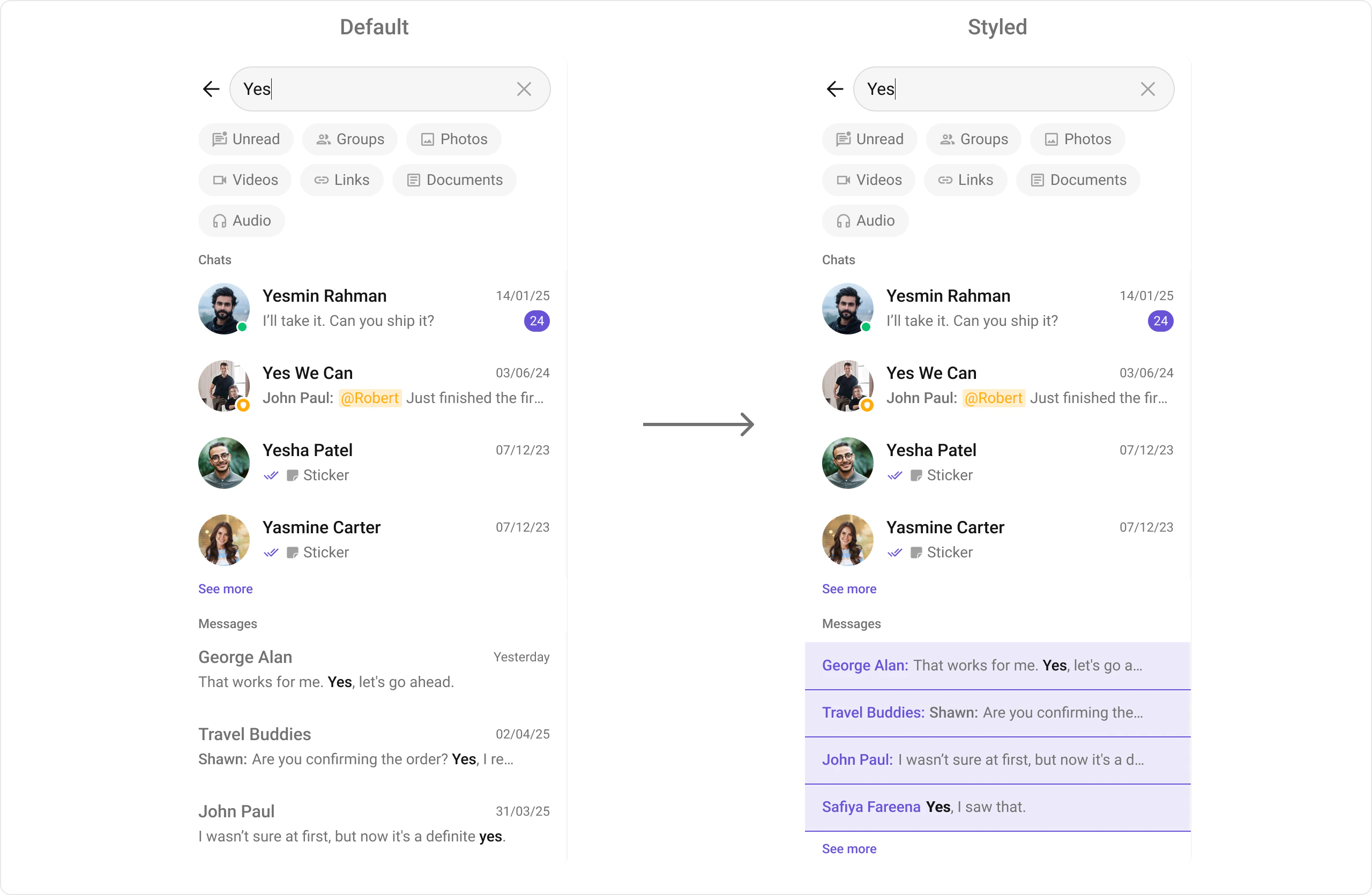
Using Style, you can customize the look and feel of the component in your app. These parameters typically control elements such as the color, size, shape, and fonts used within the component.
CometChatSearch with custom styling showing modified background color, list item styling, and custom fonts applied
import CometChatUIKitSwift

// Instance-level styling
let style = SearchStyle()
style.backgroundColor = UIColor(hex: "#EDEAFA")
style.listItemBackground = UIColor(hex: "#EDEAFA")
style.listItemTitleFont = UIFont(name: "TimesNewRomanPS-Regular", size: 16)
style.titleFont = UIFont(name: "TimesNewRomanPS-Bold", size: 12)
style.searchBarPlaceholderTextFont = UIFont(name: "TimesNewRomanPS-Regular", size: 12)

let searchVC = CometChatSearch()
searchVC.style = style
self?.navigationController?.pushViewController(searchVC, animated: true)

// Global-level styling
CometChatSearch.style.backgroundColor = UIColor(hex: "#EDEAFA")
CometChatSearch.style.listItemBackground = UIColor(hex: "#EDEAFA")
CometChatSearch.style.listItemTitleFont = UIFont(name: "TimesNewRomanPS-Regular", size: 16)
CometChatSearch.style.titleFont = UIFont(name: "TimesNewRomanPS-Bold", size: 12)
CometChatSearch.style.searchBarPlaceholderTextFont = UIFont(name: "TimesNewRomanPS-Regular", size: 12)

Functionality

These are small functional customizations that allow you to fine-tune the overall experience of the component. With these, you can toggle the visibility of UI elements.
PropertyDescriptionExample
userRestrict search to a specific user chatsearch.user = user
groupRestrict search to a groupsearch.group = group
hideUserStatusHide online/offline indicatorsearch.hideUserStatus = true
hideGroupTypeHide group type iconsearch.hideGroupType = true
hideBackButtonHide the back buttonsearch.hideBackButton = true
hideReceiptsHide message read/delivery receipt indicatorssearch.hideReceipts = true
searchFiltersFilters like “Unread”, “Groups”, “Photos”, etc.search.set(searchFilters: [.unread, .groups, .photos])
initialSearchFilterDefault filter to apply on loadsearch.set(searchFilters: [...], initialFilter: .photos)
searchIn (searchScopes)Restrict search: messages / conversations / bothsearch.set(searchIn: [.messages, .conversations])
loadingViewCustom loader viewsearch.set(loadingView: spinner)
emptyViewCustom empty result viewsearch.set(emptyView: emptyView)
errorViewCustom error UIsearch.set(errorView: errorView)
initialViewCustom view before search query is enteredsearch.set(initialView: initialView)
disableTypingDisable typing indicatorssearch.disableTyping = true
disableSoundForMessagesDisable message soundssearch.disableSoundForMessages = true
customSoundForMessagesCustom sound URL for messagessearch.customSoundForMessages = URL(string: "...")

Advanced

For advanced-level customization, you can set custom views to the component. This lets you tailor each aspect of the component to fit your exact needs and application aesthetics. You can create and define your own views, layouts, and UI elements and then incorporate those into the component.

Conversation View Customization

FunctionDescription
listItemViewForConversationAssign a custom list item view to a conversation.
leadingViewForConversationAssign a custom leading view to a conversation.
titleViewForConversationAssign a custom title view to a conversation.
subtitleViewForConversationAssign a custom subtitle view to a conversation.
tailViewForConversationAssign a custom trailing view to a conversation.
import CometChatUIKitSwift

let searchVC = CometChatSearch()

searchVC.set(listItemViewForConversation: { conversation in
    let customView = UIView()
    // Configure custom conversation view
    return customView
})

Message View Customization

With message item view functions, you can assign custom views to different types of messages in the search result. For more information, refer to the itemView prop of the CometChatMessages component. Here’s how you can override the default message item view with a custom one for text messages:
import CometChatUIKitSwift

let searchVC = CometChatSearch()
searchVC.set(listItemViewForMessage: { message in
    return SearchMessageItemView()
})
CometChatSearch with custom message item view showing sender name and message text in a customized layout with purple accent styling
Custom view implementation:
class SearchMessageItemView: UIView {

    // MARK: - UI Components
    
    private let containerView: UIView = {
        let view = UIView()
        view.backgroundColor = UIColor(red: 0.95, green: 0.93, blue: 0.98, alpha: 1.0)
        return view
    }()
    
    private let senderLabel: UILabel = {
        let label = UILabel()
        label.font = UIFont.boldSystemFont(ofSize: 16)
        label.textColor = UIColor(red: 0.37, green: 0.22, blue: 0.73, alpha: 1.0)
        return label
    }()
    
    private let messageLabel: UILabel = {
        let label = UILabel()
        label.font = UIFont.systemFont(ofSize: 16)
        label.textColor = UIColor.darkGray
        label.numberOfLines = 1
        label.lineBreakMode = .byTruncatingTail
        return label
    }()
    
    private let bottomLine: UIView = {
        let view = UIView()
        view.backgroundColor = UIColor(red: 0.37, green: 0.22, blue: 0.73, alpha: 1.0)
        return view
    }()
    
    private let stack: UIStackView = {
        let stack = UIStackView()
        stack.axis = .horizontal
        stack.spacing = 4
        stack.alignment = .center
        return stack
    }()
    
    // MARK: - Initialization
    
    override init(frame: CGRect) {
        super.init(frame: frame)
        setupUI()
    }
    
    required init?(coder: NSCoder) {
        super.init(coder: coder)
        setupUI()
    }
    
    // MARK: - Setup
    
    private func setupUI() {
        addSubview(containerView)
        containerView.translatesAutoresizingMaskIntoConstraints = false
        
        containerView.addSubview(stack)
        stack.translatesAutoresizingMaskIntoConstraints = false
        
        containerView.addSubview(bottomLine)
        bottomLine.translatesAutoresizingMaskIntoConstraints = false
        
        stack.addArrangedSubview(senderLabel)
        stack.addArrangedSubview(messageLabel)

        NSLayoutConstraint.activate([
            containerView.topAnchor.constraint(equalTo: topAnchor),
            containerView.leadingAnchor.constraint(equalTo: leadingAnchor),
            containerView.trailingAnchor.constraint(equalTo: trailingAnchor),
            containerView.bottomAnchor.constraint(equalTo: bottomAnchor),
            
            stack.topAnchor.constraint(equalTo: containerView.topAnchor, constant: 12),
            stack.leadingAnchor.constraint(equalTo: containerView.leadingAnchor, constant: 12),
            stack.trailingAnchor.constraint(equalTo: containerView.trailingAnchor, constant: -12),
            
            bottomLine.heightAnchor.constraint(equalToConstant: 2),
            bottomLine.leadingAnchor.constraint(equalTo: containerView.leadingAnchor),
            bottomLine.trailingAnchor.constraint(equalTo: containerView.trailingAnchor),
            bottomLine.bottomAnchor.constraint(equalTo: containerView.bottomAnchor)
        ])
    }
    
    // MARK: - Configuration
    
    /// Configure view with sender name and message text
    /// - Parameters:
    ///   - sender: The sender's name
    ///   - message: The message content
    ///   - boldKeyword: Optional keyword to highlight in bold
    func configure(sender: String, message: String, boldKeyword: String?) {
        senderLabel.text = sender + ":"
        
        if let keyword = boldKeyword, message.contains(keyword) {
            let attributed = NSMutableAttributedString(string: message)
            let range = (message as NSString).range(of: keyword)
            attributed.addAttribute(.font, value: UIFont.boldSystemFont(ofSize: 16), range: range)
            messageLabel.attributedText = attributed
        } else {
            messageLabel.text = message
        }
    }
}
Available message item view functions for customization:
FunctionMessage Type
listItemViewForMessageText Message
listItemViewForImageImage Message
listItemViewForVideoVideo Message
listItemViewForAudioAudio Message
listItemViewForDocumentDocument Message
listItemViewForLinkLink Message
import CometChatUIKitSwift

let searchVC = CometChatSearch()

// Custom view for image messages
searchVC.set(listItemViewForImage: { mediaMessage in
    let customView = UIView()
    // Configure custom image message view
    return customView
})

// Custom view for video messages
searchVC.set(listItemViewForVideo: { mediaMessage in
    let customView = UIView()
    // Configure custom video message view
    return customView
})

// Custom view for audio messages
searchVC.set(listItemViewForAudio: { mediaMessage in
    let customView = UIView()
    // Configure custom audio message view
    return customView
})

// Custom view for document messages
searchVC.set(listItemViewForDocument: { mediaMessage in
    let customView = UIView()
    // Configure custom document message view
    return customView
})

// Custom view for link messages
searchVC.set(listItemViewForLink: { mediaMessage in
    let customView = UIView()
    // Configure custom link message view
    return customView
})

Message Granular View Customization

For more granular control over message search results, you can customize individual parts of the message item:
FunctionDescription
leadingViewForMessageReplaces the message avatar / left section
titleViewForMessageReplaces the message title text
subtitleViewForMessageReplaces the message subtitle text
trailingViewForMessageReplaces the message trailing section
import CometChatUIKitSwift

let searchVC = CometChatSearch()

// Custom leading view for messages (avatar area)
searchVC.set(leadingViewForMessage: { message in
    let customView = UIView()
    customView.backgroundColor = .systemPurple
    customView.layer.cornerRadius = 24
    // Configure custom leading view
    return customView
})

// Custom title view for messages
searchVC.set(titleViewForMessage: { message in
    let label = UILabel()
    label.text = message.sender?.name ?? "Unknown"
    label.font = .boldSystemFont(ofSize: 16)
    return label
})

// Custom subtitle view for messages
searchVC.set(subtitleViewForMessage: { message in
    let label = UILabel()
    if let textMessage = message as? TextMessage {
        label.text = textMessage.text
    } else {
        label.text = message.type
    }
    label.textColor = .secondaryLabel
    return label
})

// Custom trailing view for messages
searchVC.set(trailingViewForMessage: { message in
    let label = UILabel()
    let date = Date(timeIntervalSince1970: TimeInterval(message.sentAt))
    let formatter = DateFormatter()
    formatter.dateFormat = "HH:mm"
    label.text = formatter.string(from: date)
    label.font = .systemFont(ofSize: 12)
    label.textColor = .tertiaryLabel
    return label
})

Initial View

Customize the view displayed before the user enters a search query using the initialView property.
import CometChatUIKitSwift

let searchVC = CometChatSearch()

// Create a custom initial view
let initialView = UIView()
let imageView = UIImageView(image: UIImage(systemName: "magnifyingglass"))
imageView.tintColor = .systemGray
imageView.contentMode = .scaleAspectFit
imageView.translatesAutoresizingMaskIntoConstraints = false

let label = UILabel()
label.text = "Search for conversations and messages"
label.textColor = .secondaryLabel
label.textAlignment = .center
label.translatesAutoresizingMaskIntoConstraints = false

initialView.addSubview(imageView)
initialView.addSubview(label)

NSLayoutConstraint.activate([
    imageView.centerXAnchor.constraint(equalTo: initialView.centerXAnchor),
    imageView.centerYAnchor.constraint(equalTo: initialView.centerYAnchor, constant: -20),
    imageView.widthAnchor.constraint(equalToConstant: 60),
    imageView.heightAnchor.constraint(equalToConstant: 60),
    label.topAnchor.constraint(equalTo: imageView.bottomAnchor, constant: 16),
    label.leadingAnchor.constraint(equalTo: initialView.leadingAnchor, constant: 20),
    label.trailingAnchor.constraint(equalTo: initialView.trailingAnchor, constant: -20)
])

searchVC.set(initialView: initialView)

Mention Configuration

Configure how @all mentions appear in search results using the setMentionAllLabel method.
import CometChatUIKitSwift

let searchVC = CometChatSearch()

// Set a custom label for @all mentions
searchVC.setMentionAllLabel("all", "Everyone")

DateTime Formatters

By providing a custom implementation of the DateTimeFormatterCallback, you can configure how time and date values are displayed. This ensures consistent formatting for labels such as “Today”, “Yesterday”, “X minutes ago”, and more.
import CometChatUIKitSwift

let searchVC = CometChatSearch()

searchVC.dateTimeFormatter.today = { timestamp in
    return "Today • \(formattedTime(timestamp))"
}

searchVC.dateTimeFormatter.otherDay = { timestamp in
    let df = DateFormatter()
    df.dateFormat = "dd MMM yyyy"
    return df.string(from: Date(timeIntervalSince1970: timestamp))
}

Text Formatters

The setTextFormatters method enables developers to define and apply text formatters that dynamically modify or transform message content before rendering it in the UI. Text formatters can be used for:
  • Automatically converting URLs into clickable links
  • Applying Markdown or rich text styling
  • Replacing certain words or patterns with emojis or predefined text
  • Censoring specific words for moderation
By utilizing this method, developers can enhance readability, usability, and compliance with content guidelines. See the MentionsFormatter Guide for more details.

Common Patterns

Present Search from Conversations

Open the search screen from a conversations list:
@objc func openSearch() {
    let searchVC = CometChatSearch()
    
    searchVC.onConversationClicked = { [weak self] conversation, indexPath in
        // Navigate to messages for the selected conversation
        let messagesVC = CometChatMessages()
        if let user = conversation.conversationWith as? User {
            messagesVC.user = user
        } else if let group = conversation.conversationWith as? Group {
            messagesVC.group = group
        }
        self?.navigationController?.pushViewController(messagesVC, animated: true)
    }
    
    searchVC.onMessageClicked = { [weak self] message in
        // Navigate to the message in context
        let messagesVC = CometChatMessages()
        if let user = message.sender {
            messagesVC.user = user
        }
        self?.navigationController?.pushViewController(messagesVC, animated: true)
    }
    
    navigationController?.pushViewController(searchVC, animated: true)
}

Search Within a Specific Conversation

Limit search to messages within a specific user or group chat:
// Search within a specific user's conversation
let searchVC = CometChatSearch()
searchVC.user = user
searchVC.set(searchIn: [.messages])  // Only search messages, not conversations

// Or search within a group
let groupSearchVC = CometChatSearch()
groupSearchVC.group = group
groupSearchVC.set(searchIn: [.messages])

Filter Search by Media Type

Show only photo or video messages in search results:
let searchVC = CometChatSearch()

// Set available filters with photos as the initial selection
searchVC.set(searchFilters: [.photos, .videos, .documents, .audio], initialFilter: .photos)

// Or programmatically filter messages
let msgBuilder = MessagesRequest.MessageRequestBuilder()
    .set(categories: ["message"])
    .set(types: ["image", "video"])

searchVC.set(messagesRequestBuilder: msgBuilder)

Custom Search Result Actions

Handle search result selection with custom actions:
let searchVC = CometChatSearch()

searchVC.onMessageClicked = { [weak self] message in
    // Show action sheet for the selected message
    let alert = UIAlertController(title: nil, message: nil, preferredStyle: .actionSheet)
    
    alert.addAction(UIAlertAction(title: "Go to Message", style: .default) { _ in
        self?.navigateToMessage(message)
    })
    
    alert.addAction(UIAlertAction(title: "Reply", style: .default) { _ in
        self?.replyToMessage(message)
    })
    
    alert.addAction(UIAlertAction(title: "Forward", style: .default) { _ in
        self?.forwardMessage(message)
    })
    
    alert.addAction(UIAlertAction(title: "Cancel", style: .cancel))
    
    self?.present(alert, animated: true)
}

Conversations

Display conversation list

Message List

Display chat messages

Users

Display user list