

AI Integration Quick Reference
AI Integration Quick Reference
| Field | Value |
|---|---|
| Package | @cometchat/chat-uikit-react |
| Framework | React.js |
| Components | CometChatMessageHeader, CometChatMessageList, CometChatMessageComposer |
| Layout | Single chat window — no sidebar, no conversation list |
| Prerequisite | Complete React.js Integration Steps 1–5 first |
| Pattern | Support chat, embedded widgets, focused messaging |
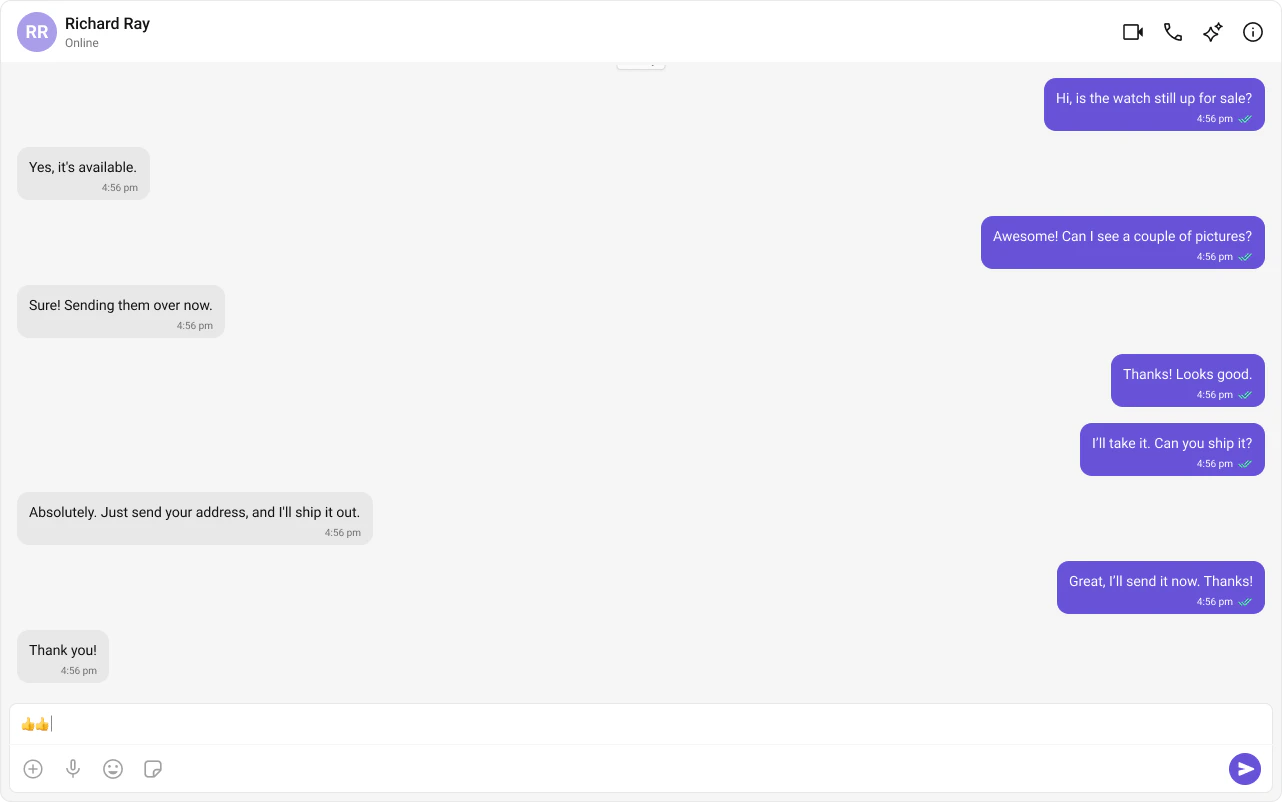

Fork the sandbox, insert your CometChat credentials (App ID, Region, Auth Key), and preview the UI in real time.
What You’re Building
Three components stacked vertically:- Chat header — displays recipient name, avatar, online status, and optional call buttons
- Message list — real-time chat history with scrolling
- Message composer — text input with media, emojis, and reactions
App.tsx and App.css.
Step 1 — Update App.tsx and App.css
The app fetches a user (or group) on mount and renders the three message components.- TypeScript
- CSS
App.tsx
CometChat.getUser(UID)fetches the user object from the SDK — you need a real user object, not a manually constructed one.- Pass either
userorgroupto the message components, never both. - The highlighted lines show where to set the UID or swap to group chat.
Switching Between User and Group Chat
To load a group chat instead of one-to-one, replace thegetUser call with getGroup:
Step 2 — Run the Project
- Vite
- Create React App
Next Steps
Theming
Customize colors, fonts, and styles to match your brand
Components Overview
Browse all prebuilt UI components
React.js Integration
Back to the main setup guide
Core Features
Chat features included out of the box